Tim Bray has a year-end blog post up that's worth a read. In case you don't know, Tim Bray is Google's Android Evangelist. As you might expect from someone who would take that job, he's as enthusiastic about the Android platform as I am about iOS. Although his perspective colors his view (as does mine), his analysis is usually pretty good.
He's got one assertion in this most recent post, however, that doesn't seem to ring true to my ear.
John Gruber seems similarly skeptical, opining yesterday that:
The argument is far from over, and it's silly to even make the assertion. I have, within arm's reach, the very 7" tablet Tim refers to - a Samsung Galaxy Tab. I have spent quality time with the Tab, and think I definitely count as part of the set known as "anyone", yet I don't see this glaring hole that Tim thinks is so obvious. Personally, I found the Tab awkward for text reading, though part of that is due to Android's abysmal text rendering engine. The only way the Tab is better than the iPad for reading is that it's lighter and more portable. As for games, I'll admit that the Tab's form factor is pretty much ideal for driving games. All other types of games I've tried, it's either no better or worse than the iPad and, of course, there's no comparison in the selection of available games yet.
The Tab is a 16:9 tablet running Android 2.2. For watching 16:9 video content like movies and HD television shows, the end result is that you get roughly the same size image video as you do on the iPad in a package that's lighter and easier to hold, which sounds like a winner, right? There are downsides, however. The smaller form factor means less room for batteries and thus shorter battery life. The energy requirements for a 7" tablet are not considerably less than those of a 10" device, but there's a lot less room for batteries. As a result, while battery life is almost never an issue on my iPad, it's often one on the Tab. If you've seen the inside of an iPad, you know that most of the heft of the iPad comes from batteries. Apple made the design decision that they'd rather have a slightly heavier device that could run all day long on a single charge with normal usage. Based on sales and reviews, I think it's safe to say that was a good decision.
Batteries are getting more efficient every year, as are processors, so at some point, a 7" device with iPad-like battery life is completely feasible, however when that happens, a 10" device will have even better battery life. But battery life is far from the only downside to this form factor.
With the exception of video, some types of games (e.g. car driving games), and likely a handful of other tasks, the smaller form factor is simply not as good as the iPad for most things you'd want to do. It sits in an uncomfortable middle ground between phone-size devices and 10" tablets like the iPad and the… well, like the iPad. The Tab does nothing considerably better than either an iPhone or an iPad. It's "as good" at a handful of tasks.
What it boils down to is that the main advantage of the 7" form factor is that it's easier to carry around with you and is lighter to hold. I'm just unconvinced that's enough of a reason to make a 7" iPad inevitable.
Personally, If I were going to buy something to fit between my iPhone 4 and my iPad, I'd buy a Kindle, and recent sales numbers seem to indicate that many people are making that choice. The Kindle does less than the Tab, but it's even lighter and it does do something better than the iPad, iPhone, and Tab: it's a better ebook reader. It gets great battery life, it's easy on your eyes, has nice text, it's easy to carry, can be held comfortably in one hand, and it's much, much cheaper.
When Apple introduced the iPad, it looked like it was going to compete, and probably kill, the burgeoning ebook reader market. Instead, it pushed those special-purpose devices into a lower price bracket where they no longer compete directly with the iPad. Looking at how the sales numbers have jumped recently, the iPad may just be the best thing that ever happened to the Kindle. The Kindle and Nook are almost down into the "impulse buy" category, and as a result, they're selling like hotcakes, often to people who already own iPads.
But where does a seven inch tablet fit into the market? What would compel someone who owns an iPad to buy one, or would compel someone to buy one instead of an iPad? There isn't really a huge unmet demand for this product to fill. There's no pressing, burning need that would cause people to buy yet another device. A seven inch tablet has to compete with products that are already on the market and that are well-established. It can't compete with the Kindle on price, size, weight, or as an ebook reader. It's not noticeably cheaper than the iPad, yet has shorter batter life. It doesn't do anything that the iPad or iPhone can't. It's only compelling advantages are that it's lighter and smaller. Well, for a small segment of the market, it has another advantage: it's not from Apple.
The Galaxy Tab has been selling pretty well, but it's got novelty working for it, and it's really the only viable non-Apple tablet on the market right now. That will not be the case for long, however. The way the iPad has sold, you can expect every computer hardware manufacturer to try to claim a piece of the tablet market. Microsoft has already announced that, for them, CES would be about "slates" yet again this year (oh, boy!).
For seven inch tablets to gain traction in the long run, they will have to provide a compelling advantage over the iPad, the iPhone, and the Kindle. If they're not going to compete on price, maybe there's some feature or ability where seven inch tablets can distinguish themselves and establish a long-term foothold, but I haven't thought of it yet, and apparently neither have the current tablet manufacturers like Samsung.
The only way Apple will release a 7" tablet is if they think of some compelling reason for such a product to exist. It's possible that the reason would be price - making a more affordable and smaller iPad available to people who can't afford a $500+ device but want something bigger than an iPod touch. That's not impossible given Apple's drive for competitive pricing in their consumer products the last few years, but it's far from a foregone conclusion.
He's got one assertion in this most recent post, however, that doesn't seem to ring true to my ear.
Apple will totally do a 7" device. Anyone who’s spent quality time reading books or playing games on the Galaxy Tab knows; there’s a great big hole in the ecosystem that needs something bigger than a handset but that still fits in one hand and you can use for four hours in a row sitting up. This argument is over.
John Gruber seems similarly skeptical, opining yesterday that:
The problem is that it’s nice, for certain tasks, to be able to hold a tablet in one hand, but you can’t do that with the current iPad. I think Bray’s mistake is assuming that using a 7-inch display is the only way to solve that problem.
The argument is far from over, and it's silly to even make the assertion. I have, within arm's reach, the very 7" tablet Tim refers to - a Samsung Galaxy Tab. I have spent quality time with the Tab, and think I definitely count as part of the set known as "anyone", yet I don't see this glaring hole that Tim thinks is so obvious. Personally, I found the Tab awkward for text reading, though part of that is due to Android's abysmal text rendering engine. The only way the Tab is better than the iPad for reading is that it's lighter and more portable. As for games, I'll admit that the Tab's form factor is pretty much ideal for driving games. All other types of games I've tried, it's either no better or worse than the iPad and, of course, there's no comparison in the selection of available games yet.
The Tab is a 16:9 tablet running Android 2.2. For watching 16:9 video content like movies and HD television shows, the end result is that you get roughly the same size image video as you do on the iPad in a package that's lighter and easier to hold, which sounds like a winner, right? There are downsides, however. The smaller form factor means less room for batteries and thus shorter battery life. The energy requirements for a 7" tablet are not considerably less than those of a 10" device, but there's a lot less room for batteries. As a result, while battery life is almost never an issue on my iPad, it's often one on the Tab. If you've seen the inside of an iPad, you know that most of the heft of the iPad comes from batteries. Apple made the design decision that they'd rather have a slightly heavier device that could run all day long on a single charge with normal usage. Based on sales and reviews, I think it's safe to say that was a good decision.
Batteries are getting more efficient every year, as are processors, so at some point, a 7" device with iPad-like battery life is completely feasible, however when that happens, a 10" device will have even better battery life. But battery life is far from the only downside to this form factor.
With the exception of video, some types of games (e.g. car driving games), and likely a handful of other tasks, the smaller form factor is simply not as good as the iPad for most things you'd want to do. It sits in an uncomfortable middle ground between phone-size devices and 10" tablets like the iPad and the… well, like the iPad. The Tab does nothing considerably better than either an iPhone or an iPad. It's "as good" at a handful of tasks.
What it boils down to is that the main advantage of the 7" form factor is that it's easier to carry around with you and is lighter to hold. I'm just unconvinced that's enough of a reason to make a 7" iPad inevitable.
Personally, If I were going to buy something to fit between my iPhone 4 and my iPad, I'd buy a Kindle, and recent sales numbers seem to indicate that many people are making that choice. The Kindle does less than the Tab, but it's even lighter and it does do something better than the iPad, iPhone, and Tab: it's a better ebook reader. It gets great battery life, it's easy on your eyes, has nice text, it's easy to carry, can be held comfortably in one hand, and it's much, much cheaper.
When Apple introduced the iPad, it looked like it was going to compete, and probably kill, the burgeoning ebook reader market. Instead, it pushed those special-purpose devices into a lower price bracket where they no longer compete directly with the iPad. Looking at how the sales numbers have jumped recently, the iPad may just be the best thing that ever happened to the Kindle. The Kindle and Nook are almost down into the "impulse buy" category, and as a result, they're selling like hotcakes, often to people who already own iPads.
But where does a seven inch tablet fit into the market? What would compel someone who owns an iPad to buy one, or would compel someone to buy one instead of an iPad? There isn't really a huge unmet demand for this product to fill. There's no pressing, burning need that would cause people to buy yet another device. A seven inch tablet has to compete with products that are already on the market and that are well-established. It can't compete with the Kindle on price, size, weight, or as an ebook reader. It's not noticeably cheaper than the iPad, yet has shorter batter life. It doesn't do anything that the iPad or iPhone can't. It's only compelling advantages are that it's lighter and smaller. Well, for a small segment of the market, it has another advantage: it's not from Apple.
The Galaxy Tab has been selling pretty well, but it's got novelty working for it, and it's really the only viable non-Apple tablet on the market right now. That will not be the case for long, however. The way the iPad has sold, you can expect every computer hardware manufacturer to try to claim a piece of the tablet market. Microsoft has already announced that, for them, CES would be about "slates" yet again this year (oh, boy!).
For seven inch tablets to gain traction in the long run, they will have to provide a compelling advantage over the iPad, the iPhone, and the Kindle. If they're not going to compete on price, maybe there's some feature or ability where seven inch tablets can distinguish themselves and establish a long-term foothold, but I haven't thought of it yet, and apparently neither have the current tablet manufacturers like Samsung.
The only way Apple will release a 7" tablet is if they think of some compelling reason for such a product to exist. It's possible that the reason would be price - making a more affordable and smaller iPad available to people who can't afford a $500+ device but want something bigger than an iPod touch. That's not impossible given Apple's drive for competitive pricing in their consumer products the last few years, but it's far from a foregone conclusion.
Core Animation is awesome. It makes doing a lot of complex, fancy animations downright easy. One of the really nice built-in features of Core Animation is the ability to use animation curves. These curves let you specify whether the animation happens linearly (at the same pace throughout the animation), or whether the animation eases in, eases out, or does both.
When you have to go closer to the metal and use OpenGL ES, you're not so lucky. We don't have animation curves provided for us in OpenGL ES. We have to interpolate ourselves. Fortunately, the math behind animation curves is straightforward. Plus, there are far more curves than just the four Apple offers.
I haven't run across a good library for generating animation curves, so I've decided to release my animation curve functions as public domain (no attribute required, no rights reserved). Here is a graph of all the different animation curves I'm releasing:
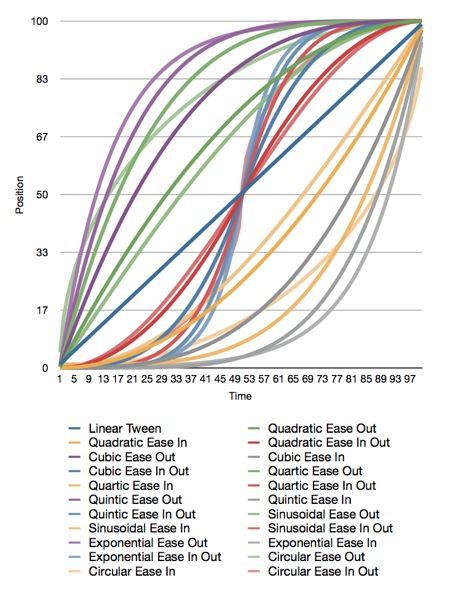
Here is the original Numbers.app document that generated the graph, and here is the Xcode project that generated the data. The project also contains all the functions needed to plot these curves.
Apple doesn't document which calculations they use for easing, but my guess is that they're quadratic. I'm not sure, though, since many of the curves yield similar results.
All of the interpolation functions included in the Xcode project above take three inputs and return a GLfloat containing the interpolated value. The first parameter, t, is the percent of the way through the animation you want a value calculated for. This is a clamped float that should be in the range 0.0 to 1.0. Values above 1.0 will be treated as 1.0 and values below 0.0 are treated as 0.0. The second parameter, start, is the value when the animation starts. The third parameter, end, is the final value to be animated toward.
If you want to apply a curve to a CGPoint or Vector3D, you have to call the function multiple times for each component (x/y or x/y/z).
Have fun!
Here are the functions included in the project above:
When you have to go closer to the metal and use OpenGL ES, you're not so lucky. We don't have animation curves provided for us in OpenGL ES. We have to interpolate ourselves. Fortunately, the math behind animation curves is straightforward. Plus, there are far more curves than just the four Apple offers.
I haven't run across a good library for generating animation curves, so I've decided to release my animation curve functions as public domain (no attribute required, no rights reserved). Here is a graph of all the different animation curves I'm releasing:
Here is the original Numbers.app document that generated the graph, and here is the Xcode project that generated the data. The project also contains all the functions needed to plot these curves.
Apple doesn't document which calculations they use for easing, but my guess is that they're quadratic. I'm not sure, though, since many of the curves yield similar results.
All of the interpolation functions included in the Xcode project above take three inputs and return a GLfloat containing the interpolated value. The first parameter, t, is the percent of the way through the animation you want a value calculated for. This is a clamped float that should be in the range 0.0 to 1.0. Values above 1.0 will be treated as 1.0 and values below 0.0 are treated as 0.0. The second parameter, start, is the value when the animation starts. The third parameter, end, is the final value to be animated toward.
If you want to apply a curve to a CGPoint or Vector3D, you have to call the function multiple times for each component (x/y or x/y/z).
Have fun!
Here are the functions included in the project above:
#include <OpenGLES/ES2/gl.h>
#include <OpenGLES/ES2/glext.h>
#include <math.h>

#define BoundsCheck(t, start, end) \
if (t <= 0.f) return start;        \
else if (t >= 1.f) return end;

GLfloat LinearInterpolation(GLclampf t, GLfloat start, GLfloat end)
{
    BoundsCheck(t, start, end);
    return t * end + (1.f - t) * start;
}
#pragma mark -
#pragma mark Quadratic
GLfloat QuadraticEaseOut(GLclampf t, GLfloat start, GLfloat end)
{
    BoundsCheck(t, start, end);
    return   -end * t * (t - 2.f) -1.f;
}
GLfloat QuadraticEaseIn(GLclampf t, GLfloat start, GLfloat end)
{
    BoundsCheck(t, start, end);
    return end * t * t + start - 1.f;
}
GLfloat QuadraticEaseInOut(GLclampf t, GLfloat start, GLfloat end)
{
    BoundsCheck(t, start, end);
    t *= 2.f;
    if (t < 1.f) return end/2.f * t * t + start - 1.f;
    t--;
    return -end/2.f * (t*(t-2) - 1) + start - 1.f;
}
#pragma mark -
#pragma mark Cubic
GLfloat CubicEaseOut(GLclampf t, GLfloat start, GLfloat end)
{
    BoundsCheck(t, start, end);
    t--;
    return end*(t * t * t + 1.f) + start - 1.f;
}
GLfloat CubicEaseIn(GLclampf t, GLfloat start, GLfloat end)
{
    BoundsCheck(t, start, end);
    return end * t * t * t+ start - 1.f;
}
GLfloat CubicEaseInOut(GLclampf t, GLfloat start, GLfloat end)
{
    BoundsCheck(t, start, end);
    t *= 2.;
    if (t < 1.) return end/2 * t * t * t + start - 1.f;
    t -= 2;
    return end/2*(t * t * t + 2) + start - 1.f;
}
#pragma mark -
#pragma mark Quintic
GLfloat QuarticEaseOut(GLclampf t, GLfloat start, GLfloat end)
{
    BoundsCheck(t, start, end);
    t--;
    return -end * (t * t * t * t - 1) + start - 1.f;
}
GLfloat QuarticEaseIn(GLclampf t, GLfloat start, GLfloat end)
{
    BoundsCheck(t, start, end);
    return end * t * t * t * t + start;
}
GLfloat QuarticEaseInOut(GLclampf t, GLfloat start, GLfloat end)
{
    BoundsCheck(t, start, end);
    t *= 2.f;
    if (t < 1.f)
        return end/2.f * t * t * t * t + start - 1.f;
    t -= 2.f;
    return -end/2.f * (t * t * t * t - 2.f) + start - 1.f;
}
#pragma mark -
#pragma mark Quintic
GLfloat QuinticEaseOut(GLclampf t, GLfloat start, GLfloat end)
{
    BoundsCheck(t, start, end);
    t--;
    return end * (t * t * t * t * t + 1) + start - 1.f;
}
GLfloat QuinticEaseIn(GLclampf t, GLfloat start, GLfloat end)
{
    BoundsCheck(t, start, end);
    return end * t * t * t * t * t + start - 1.f;
}
GLfloat QuinticEaseInOut(GLclampf t, GLfloat start, GLfloat end)
{
    BoundsCheck(t, start, end);
    t *= 2.f;
    if (t < 1.f)
        return end/2 * t * t * t * t * t + start - 1.f;
    t -= 2;
    return end/2 * ( t * t * t * t * t + 2) + start - 1.f;
}
#pragma mark -
#pragma mark Sinusoidal
GLfloat SinusoidalEaseOut(GLclampf t, GLfloat start, GLfloat end)
{
    BoundsCheck(t, start, end);
    return end * sinf(t * (M_PI/2)) + start - 1.f;
}
GLfloat SinusoidalEaseIn(GLclampf t, GLfloat start, GLfloat end)
{
    BoundsCheck(t, start, end);
    return -end * cosf(t * (M_PI/2)) + end + start - 1.f;
}
GLfloat SinusoidalEaseInOut(GLclampf t, GLfloat start, GLfloat end)
{
    BoundsCheck(t, start, end);
    return -end/2.f * (cosf(M_PI*t) - 1.f) + start - 1.f;
}
#pragma mark -
#pragma mark Exponential
GLfloat ExponentialEaseOut(GLclampf t, GLfloat start, GLfloat end)
{
    BoundsCheck(t, start, end);
    return end * (-powf(2.f, -10.f * t) + 1.f ) + start - 1.f;
}
GLfloat ExponentialEaseIn(GLclampf t, GLfloat start, GLfloat end)
{
    BoundsCheck(t, start, end);
    return end * powf(2.f, 10.f * (t - 1.f) ) + start - 1.f;
}
GLfloat ExponentialEaseInOut(GLclampf t, GLfloat start, GLfloat end)
{
    BoundsCheck(t, start, end);
    t *= 2.f;
    if (t < 1.f)
        return end/2.f * powf(2.f, 10.f * (t - 1.f) ) + start - 1.f;
    t--;
    return end/2.f * ( -powf(2.f, -10.f * t) + 2.f ) + start - 1.f;
}
#pragma mark -
#pragma mark Circular
GLfloat CircularEaseOut(GLclampf t, GLfloat start, GLfloat end)
{
    BoundsCheck(t, start, end);
    t--;
    return end * sqrtf(1.f - t * t) + start - 1.f;
}
GLfloat CircularEaseIn(GLclampf t, GLfloat start, GLfloat end)
{
    BoundsCheck(t, start, end);
    return -end * (sqrtf(1.f - t * t) - 1.f) + start - 1.f;
}
GLfloat CircularEaseInOut(GLclampf t, GLfloat start, GLfloat end)
{
    BoundsCheck(t, start, end);
    t *= 2.f;
    if (t < 1.f)
        return -end/2.f * (sqrtf(1.f - t * t) - 1.f) + start - 1.f;
    t -= 2.f;
    return end/2.f * (sqrtf(1.f - t * t) + 1.f) + start - 1.f;
}
Well, I'm not sure how I never ran across it before, but Philip Rideout, author of O'Reilly's iPhone 3D (a book I recommended last week), has a hell of a blog for people interested in OpenGL. A lot of the posts are specific to desktop OpenGL (and recent versions of OpenGL at that!), but there's tons of great information that applies to OpenGL ES as well. It's a veritable treasure trove of advanced graphics goodness from a guy who's been doing it for years.