I'm coming up on the end of my second week using my treadmill desk, albeit two relatively quiet work weeks thanks to the holidays. I haven't put together the plans yet for those who might be interested in building a similar one, but the desk does seem to be holding up well. It's still very sturdy and has been working great for me.
After a really great first day where I put in over nine miles, my daily averages have backed off a bit to more in the 6-7 mile range and I'm averaging about 800 calories a day burned according to the treadmill. It seems that 1.6 MPH is my sweet spot for being able to type and mouse, though I sometimes go a little slower if I'm tired. I also usually start the morning at about 1.3 MPH, but after about 15 minutes, I'm usually up to 1.6.
I'm not finding it difficult to work for the most part. In fact, often I feel more alert and able to deal with complex problems. However, late in the day, I often feel just the opposite. I start to get fatigued, and when I do, then I often find that a difficult problem requires me to go over to my sitting desk or else needs to be pushed off until the next morning when I'm fresh. I suspect that this problem will go away as I continue to get used to it and am able to walk longer.
I currently spend about 4 hours walking, another 1-2 standing at my new desk, and the rest of my workday right now is at my old sitting desk. My goal is to get up to at least 8 hours of walking, but I'm really happy with this so far. It's not hard to do. There's no motivation for me to find. It's just part of my routine. When I go to my office, I start the treadmill. Easy-peazy.
I'm walking slow enough that I'm not experiencing much in the way of muscle soreness. A tiny bit in my calf last week, but none this week. There are some other problems that go along with the treadmill desk, however. First and foremost, my feet start to hurt something fierce by the end of the day. This week was better than last, and I suspect in a few weeks it will be a non-issue. A lot of it, admittedly, was poor shoe choice. More on that later.
Another problem with spending this amount of time moving is the potential for chafing and rashes. It goes away relatively quickly if you're smart enough to wear appropriate clothing, which I wasn't at first. If you experience chafing, here's two words to remember: coconut oil. Yep, the kind you buy for cooking. It's a solid at room temperature, but will turn into liquid from the heat of your hands. It's magic for irritated skin and it's also a lubricant. It's better than any lotion or salve I've ever tried.
I close my office door and open the window while I'm working, even though it's winter and I wear shorts and a t-shirt while working. Even at that, I'm a little warm, but I'm a warm person in general, always have been. I haven't broken out my winter jacket yet this year, so your experience might be different. Nobody I've talked to has mentioned being this warm, so it might just be me.
This one's important. Get some good walking shoes. Don't wear your existing sneakers or shoes, or worse, don't be stupid and go barefoot or wear sandals, crocs or whatever shoes happen to be closest to you. Good shoes, designed for walking, fitted by somebody who knows WTF they are doing. Four or more hours of walking is a lot of steps you're taking each day. Your feet will thank you.
So, the big question people probably want to know is: Have I lost weight?
It's really too early to tell. The scale says I've lost between two and four pounds, but honestly, my weight can fluctuate more than that just from water weight over the course of a single day. I might have lost nothing, or I might have lost more than that. I need more data points before I can form any conclusions. But, I suspect I have lost some. Even with a holiday party last weekend, I've been eating less than normal. I'm not sure if it's psychological or physiological, but I'm hungry less, and when I do eat, I'm tending to eat less and to eat healthier. I also haven't been tempted by my personal demon, the midnight snack. Well, more like the 2:30am-up-late-coding snack. Part of that may simply be that I'm too tired to work until 2:30am these days, though.
Overall, I'm declaring the experiment a success already. I'm able to work just as well walking as I am sitting except when I get fatigued, I'm burning calories while I work, and am just generally feeling better than I have in a long time.
After a really great first day where I put in over nine miles, my daily averages have backed off a bit to more in the 6-7 mile range and I'm averaging about 800 calories a day burned according to the treadmill. It seems that 1.6 MPH is my sweet spot for being able to type and mouse, though I sometimes go a little slower if I'm tired. I also usually start the morning at about 1.3 MPH, but after about 15 minutes, I'm usually up to 1.6.
I'm not finding it difficult to work for the most part. In fact, often I feel more alert and able to deal with complex problems. However, late in the day, I often feel just the opposite. I start to get fatigued, and when I do, then I often find that a difficult problem requires me to go over to my sitting desk or else needs to be pushed off until the next morning when I'm fresh. I suspect that this problem will go away as I continue to get used to it and am able to walk longer.
I currently spend about 4 hours walking, another 1-2 standing at my new desk, and the rest of my workday right now is at my old sitting desk. My goal is to get up to at least 8 hours of walking, but I'm really happy with this so far. It's not hard to do. There's no motivation for me to find. It's just part of my routine. When I go to my office, I start the treadmill. Easy-peazy.
I'm walking slow enough that I'm not experiencing much in the way of muscle soreness. A tiny bit in my calf last week, but none this week. There are some other problems that go along with the treadmill desk, however. First and foremost, my feet start to hurt something fierce by the end of the day. This week was better than last, and I suspect in a few weeks it will be a non-issue. A lot of it, admittedly, was poor shoe choice. More on that later.
Another problem with spending this amount of time moving is the potential for chafing and rashes. It goes away relatively quickly if you're smart enough to wear appropriate clothing, which I wasn't at first. If you experience chafing, here's two words to remember: coconut oil. Yep, the kind you buy for cooking. It's a solid at room temperature, but will turn into liquid from the heat of your hands. It's magic for irritated skin and it's also a lubricant. It's better than any lotion or salve I've ever tried.
I close my office door and open the window while I'm working, even though it's winter and I wear shorts and a t-shirt while working. Even at that, I'm a little warm, but I'm a warm person in general, always have been. I haven't broken out my winter jacket yet this year, so your experience might be different. Nobody I've talked to has mentioned being this warm, so it might just be me.
This one's important. Get some good walking shoes. Don't wear your existing sneakers or shoes, or worse, don't be stupid and go barefoot or wear sandals, crocs or whatever shoes happen to be closest to you. Good shoes, designed for walking, fitted by somebody who knows WTF they are doing. Four or more hours of walking is a lot of steps you're taking each day. Your feet will thank you.
So, the big question people probably want to know is: Have I lost weight?
It's really too early to tell. The scale says I've lost between two and four pounds, but honestly, my weight can fluctuate more than that just from water weight over the course of a single day. I might have lost nothing, or I might have lost more than that. I need more data points before I can form any conclusions. But, I suspect I have lost some. Even with a holiday party last weekend, I've been eating less than normal. I'm not sure if it's psychological or physiological, but I'm hungry less, and when I do eat, I'm tending to eat less and to eat healthier. I also haven't been tempted by my personal demon, the midnight snack. Well, more like the 2:30am-up-late-coding snack. Part of that may simply be that I'm too tired to work until 2:30am these days, though.
Overall, I'm declaring the experiment a success already. I'm able to work just as well walking as I am sitting except when I get fatigued, I'm burning calories while I work, and am just generally feeling better than I have in a long time.
Software development is not the easiest vocation for getting or staying in shape. For that matter, being part-owner of a relatively young business isn't either.
I've been steadily putting on weight and getting in worse shape since before the dot com boom. Since we started MartianCraft, I've had very few days off, and my average work day has been probably twelve hours, possibly longer. Every time I try and get into a routine of exercising, something happens: a client emergency, a deadline, a build, a new prospective client, a minor family emergency. When there's not enough hours in the day (and there never are), the exercise was always the first thing to get cut.
Recently, I came across this brilliantly simple idea from a Mayo Clinic cardiologist. It's called the Treadmill Desk. Essentially, you replace your chair with a treadmill, and instead of trying to get a good strenuous calorie-burning bout of exercise in a few times a week, you just walk while you're working. You don't walk fast; in fact, you go quite slow. They typically recommend that you walk between one and two miles per hour, which is about half of most people's normal walking speed. This speed allows you to function fairly normally. After just a few minutes, you can type and mouse normally. If it gets hard to type, you back off on the speed a little. It's not a race. It's not even exercise in the traditional sense.
I'm typing this blog post while walking on a treadmill.
The goal with this walking is not to break a sweat, but rather to just be in constant motion. You will want your office a touch cooler than normal, though, as even slow walking does raise your body temperature. Despite the low-key nature of the movement, a typical person burns an additional 100 - 130 calories per hour they're at their desk. For a typical person working an eight hour day, that's between 800 and 1040 calories per day. If you work longer hours or weigh more than the average person, it's even more calories. Now, think about that. You have to burn approximately 3500 calories to lose a pound of weight, so assuming you don't increase your caloric intake, that's about a pound every three to four days of work, or two pounds a week. For someone working a forty hour week, that's about five pounds a month, or sixty pounds a year without additional exercise or dieting. There's a lot of health benefits that go along with losing extra weight, also. Lower blood pressure, lower cholesterol, lower incidence of several types of cancer.
If you work more than forty hours a week, the benefits can be even greater, assuming you don't eat more to make up for the extra calories you burn.
I've talked to a number of people who are using treadmill desks, and the feedback was universally positive. Everybody lost weight – several of them a considerable amount – and all were in better health than when they started. And almost everyone said the following word-for-word phrase to me: "I would never go back to a normal desk".
After about the third person gave me the same basic story, I was sold. Sign me up! I can do this.
But there was a problem.
There are lots of plans for treadmill desks around the Internet and you can actually buy treadmill desks now. But, here's the thing: My primary machine is a Mac Pro with two 27" ACD monitors along with a crap-ton of accessories. I couldn't find any desk for under $5,000 that looked sturdy enough to safely and securely hold the weight of all my gear, and all the plans I found for building one seemed to assume the use of a laptop or small computer with small monitor.
Because of that big sheet of glass, Apple's monitors are heavy. Because of that big aluminum case, the Mac Pro is also very heavy. My computer and monitors alone weigh well over a hundred pounds, and I wasn't about to trust that much weight worth that much money to something that looked flimsy or was designed to hold a laptop.
I experimented for a week using a makeshift treadmill desk with my MacBook Air, and I found the walking and working quite easy to do, but also found myself constantly pining to move back to my desk to use my more powerful machine and bigger monitors. I usually abandoned the treadmill after about two hours when I'd start getting into more hardcore coding, not because of the treadmill, but because of the computer.
But, that week was enough to convince me that this was a good way to reverse the slow but persistent upward trend in my weight that's marked the last several years of my life. Unfortunately, it also convinced me that I could only make it work if I could find a way to use my computer while walking.
So, I decided to build my own desk. Building a sturdy desk this tall (over four feet tall in my case, since I'm 6'3" and will be standing on a treadmill desk that's about 6" high) turned out to be an interesting, but not-entirely-trivial engineering exercise. It took a couple of re-designs and a lot of swearing, but my desk is now done and I've been happily using it for a couple of days now.
Here's my rig on my desk (excuse the messy office):
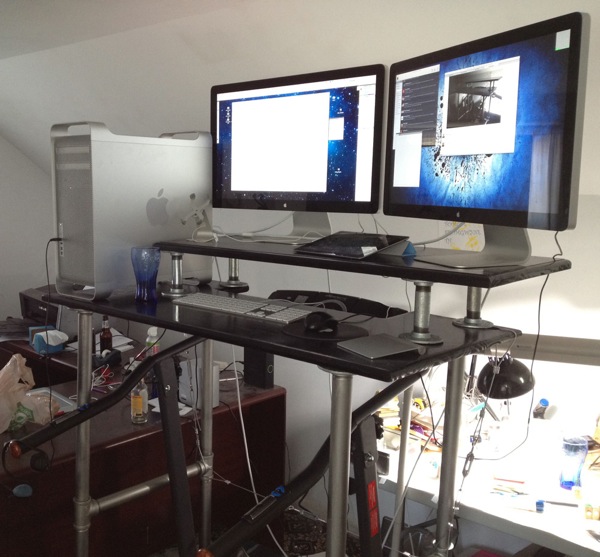
(Yes, there's a beer bottle in the background. That was my reward for finishing the desk.)
After I've been using it for longer and am convinced the design is good, I'll share how I made the desk for anyone who might wish to build one for themselves.
So far, so good, though. The desk seems to be solid, has no perceptible wobble, and the monitors and computer don't seem to be putting any noticeable strain on it. Yesterday, I walked nearly nine miles at an average of 1.6 mile per hour and had a productive work day. Today's about half over and I've burned a little over 600 calories while fixing two pretty gnarly bugs in client apps. These two days have been enough to convince me that this is going to work.
By having my good computer on the treadmill desk and my MacBook Air at my regular desk, there's a built-in incentive for me to walk, or at least stand, rather than sit at my desk. I'm simply more productive when I have more screen real estate and a more powerful computer.
In a week or so, I'll put together a parts list and basic instructions, but the design is pretty basic. 1¼" galvanized pipe makes up the main frame of the desk with ⅛" wire rope and turnbuckles as guy wires to provide additional lateral stability.
This is the treadmill I use:
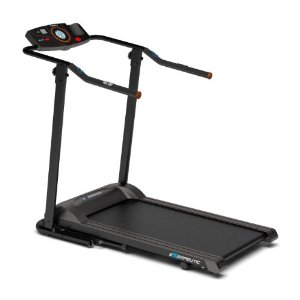
It's designed only for walking, will hold up to 400 pounds, and it's shorter than most treadmills, so it takes up less room. It's not cheap, but it's fairly reasonable for a treadmill at $400, and it can fold up out of the way if you need to. I've been very happy with it so far. While it's not whisper quiet, it's nowhere near as loud as most treadmills I've used, and it has a full set of controls on the handle where you can reach them easily while using it as part of a treadmill desk, which is much nicer than having to awkwardly reach over the desk to the treadmill's console.
The desk plans (when I post them them) are intended to work with this treadmill, you will probably need to make minor adjustments to use it with other models, as well as account for any height difference.
I've been steadily putting on weight and getting in worse shape since before the dot com boom. Since we started MartianCraft, I've had very few days off, and my average work day has been probably twelve hours, possibly longer. Every time I try and get into a routine of exercising, something happens: a client emergency, a deadline, a build, a new prospective client, a minor family emergency. When there's not enough hours in the day (and there never are), the exercise was always the first thing to get cut.
Recently, I came across this brilliantly simple idea from a Mayo Clinic cardiologist. It's called the Treadmill Desk. Essentially, you replace your chair with a treadmill, and instead of trying to get a good strenuous calorie-burning bout of exercise in a few times a week, you just walk while you're working. You don't walk fast; in fact, you go quite slow. They typically recommend that you walk between one and two miles per hour, which is about half of most people's normal walking speed. This speed allows you to function fairly normally. After just a few minutes, you can type and mouse normally. If it gets hard to type, you back off on the speed a little. It's not a race. It's not even exercise in the traditional sense.
I'm typing this blog post while walking on a treadmill.
The goal with this walking is not to break a sweat, but rather to just be in constant motion. You will want your office a touch cooler than normal, though, as even slow walking does raise your body temperature. Despite the low-key nature of the movement, a typical person burns an additional 100 - 130 calories per hour they're at their desk. For a typical person working an eight hour day, that's between 800 and 1040 calories per day. If you work longer hours or weigh more than the average person, it's even more calories. Now, think about that. You have to burn approximately 3500 calories to lose a pound of weight, so assuming you don't increase your caloric intake, that's about a pound every three to four days of work, or two pounds a week. For someone working a forty hour week, that's about five pounds a month, or sixty pounds a year without additional exercise or dieting. There's a lot of health benefits that go along with losing extra weight, also. Lower blood pressure, lower cholesterol, lower incidence of several types of cancer.
If you work more than forty hours a week, the benefits can be even greater, assuming you don't eat more to make up for the extra calories you burn.
I've talked to a number of people who are using treadmill desks, and the feedback was universally positive. Everybody lost weight – several of them a considerable amount – and all were in better health than when they started. And almost everyone said the following word-for-word phrase to me: "I would never go back to a normal desk".
After about the third person gave me the same basic story, I was sold. Sign me up! I can do this.
But there was a problem.
There are lots of plans for treadmill desks around the Internet and you can actually buy treadmill desks now. But, here's the thing: My primary machine is a Mac Pro with two 27" ACD monitors along with a crap-ton of accessories. I couldn't find any desk for under $5,000 that looked sturdy enough to safely and securely hold the weight of all my gear, and all the plans I found for building one seemed to assume the use of a laptop or small computer with small monitor.
Because of that big sheet of glass, Apple's monitors are heavy. Because of that big aluminum case, the Mac Pro is also very heavy. My computer and monitors alone weigh well over a hundred pounds, and I wasn't about to trust that much weight worth that much money to something that looked flimsy or was designed to hold a laptop.
I experimented for a week using a makeshift treadmill desk with my MacBook Air, and I found the walking and working quite easy to do, but also found myself constantly pining to move back to my desk to use my more powerful machine and bigger monitors. I usually abandoned the treadmill after about two hours when I'd start getting into more hardcore coding, not because of the treadmill, but because of the computer.
But, that week was enough to convince me that this was a good way to reverse the slow but persistent upward trend in my weight that's marked the last several years of my life. Unfortunately, it also convinced me that I could only make it work if I could find a way to use my computer while walking.
So, I decided to build my own desk. Building a sturdy desk this tall (over four feet tall in my case, since I'm 6'3" and will be standing on a treadmill desk that's about 6" high) turned out to be an interesting, but not-entirely-trivial engineering exercise. It took a couple of re-designs and a lot of swearing, but my desk is now done and I've been happily using it for a couple of days now.
Here's my rig on my desk (excuse the messy office):
After I've been using it for longer and am convinced the design is good, I'll share how I made the desk for anyone who might wish to build one for themselves.
So far, so good, though. The desk seems to be solid, has no perceptible wobble, and the monitors and computer don't seem to be putting any noticeable strain on it. Yesterday, I walked nearly nine miles at an average of 1.6 mile per hour and had a productive work day. Today's about half over and I've burned a little over 600 calories while fixing two pretty gnarly bugs in client apps. These two days have been enough to convince me that this is going to work.
By having my good computer on the treadmill desk and my MacBook Air at my regular desk, there's a built-in incentive for me to walk, or at least stand, rather than sit at my desk. I'm simply more productive when I have more screen real estate and a more powerful computer.
In a week or so, I'll put together a parts list and basic instructions, but the design is pretty basic. 1¼" galvanized pipe makes up the main frame of the desk with ⅛" wire rope and turnbuckles as guy wires to provide additional lateral stability.
This is the treadmill I use:
It's designed only for walking, will hold up to 400 pounds, and it's shorter than most treadmills, so it takes up less room. It's not cheap, but it's fairly reasonable for a treadmill at $400, and it can fold up out of the way if you need to. I've been very happy with it so far. While it's not whisper quiet, it's nowhere near as loud as most treadmills I've used, and it has a full set of controls on the handle where you can reach them easily while using it as part of a treadmill desk, which is much nicer than having to awkwardly reach over the desk to the treadmill's console.
The desk plans (when I post them them) are intended to work with this treadmill, you will probably need to make minor adjustments to use it with other models, as well as account for any height difference.
Starting today, Galaxy Nexus by Samsung will be available in the U.S. on the Verizon Wireless 4G LTE Network. Visit google.com/nexus to buy it online, or go to your nearest Verizon Wireless, Best Buy, Costco or Radio Shack store. Galaxy Nexus is also available through our carrier partners in Canada, the United Kingdom, Germany, Italy, Korea and Japan. Soon, it will be available in Australia, France, Russia, India, Taiwan, Hong Kong, and elsewhere!
Galaxy Nexus is the first phone with Android 4.0, Ice Cream Sandwich and combines the latest Google software with cutting-edge Samsung hardware. With a super slim profile, Galaxy Nexus features a 4.65” Contour Display with a true high definition (720p) resolution HD Super AMOLED screen. Galaxy Nexus also features a lightning-fast dual-core 1.2GHz processor combined with 4G LTE or HSPA+ technology. To see Galaxy Nexus in action, check out this video:
Paired with Ice Cream Sandwich, the latest Android software, Galaxy Nexus is simple and beautiful. WIth innovations like Android Beam, a camera with fun Live Effects and zero-shutter lag for instant photo capturing, a deeply integrated Google+ experience, and a new People app, Galaxy Nexus is beyond smart. Galaxy Nexus is also the first device to feature Face Unlock, which uses state-of-the-art facial recognition technology to unlock your phone. For a look at how powerful your smile can be, check out the video below.
Posted by Andy Rubin, Senior Vice President of Mobile
Galaxy Nexus is the first phone with Android 4.0, Ice Cream Sandwich and combines the latest Google software with cutting-edge Samsung hardware. With a super slim profile, Galaxy Nexus features a 4.65” Contour Display with a true high definition (720p) resolution HD Super AMOLED screen. Galaxy Nexus also features a lightning-fast dual-core 1.2GHz processor combined with 4G LTE or HSPA+ technology. To see Galaxy Nexus in action, check out this video:
Paired with Ice Cream Sandwich, the latest Android software, Galaxy Nexus is simple and beautiful. WIth innovations like Android Beam, a camera with fun Live Effects and zero-shutter lag for instant photo capturing, a deeply integrated Google+ experience, and a new People app, Galaxy Nexus is beyond smart. Galaxy Nexus is also the first device to feature Face Unlock, which uses state-of-the-art facial recognition technology to unlock your phone. For a look at how powerful your smile can be, check out the video below.
Posted by Andy Rubin, Senior Vice President of Mobile
Celebrate the most wonderful time of the year and Androidify yourself with a bunch of new winter gear. Dress up your Android with candy canes, mittens, skis, antlers, sweaters and more! (Did someone say 2012 party glasses?) Head over to Android Market to get the latest Androidify update and make your Android ready for the season!

Posted by Thomas Gayno, Marketing Manager, Creative Lab
Posted by Thomas Gayno, Marketing Manager, Creative Lab
(Cross-posted on the Inside Search blog)
With the December movie season in full swing, we’ve just made it even faster and easier to discover movies, showtimes and theaters, all from your smartphone. Now when you search for [movies] or your favorite theater like [century san francisco] on Google.com from your phone, you’ll see interactive results for movies in a new swipeable ribbon, with the most relevant information displayed at the top of the page.
For each movie, you’ll see the movie poster, a short summary, ratings and the nearest theaters and showtimes. Designed to help you quickly browse what’s playing in theaters now, this information instantly updates as you slide through the movie posters -- no need to wait for a page to load or to use the back button.


To learn more about a movie, tap the movie title to find details like the cast and a full summary. And if you see a play button on the movie poster, you can tap to view the official trailer. You can even buy tickets directly from your smartphone by tapping on underlined showtimes -- and skip past those long holiday box office lines!

So the next time you head out to see sagas of vampires, the world’s biggest Muppets fan, dancing penguins or nearly impossible heists, try the new interactive results for movies by visiting Google.com on your iOS or Android phone’s browser and searching for [movies], [theaters] or a movie title. This feature is available in English, in the US.
Posted by Toshi Tajima, Software Engineer
With the December movie season in full swing, we’ve just made it even faster and easier to discover movies, showtimes and theaters, all from your smartphone. Now when you search for [movies] or your favorite theater like [century san francisco] on Google.com from your phone, you’ll see interactive results for movies in a new swipeable ribbon, with the most relevant information displayed at the top of the page.
For each movie, you’ll see the movie poster, a short summary, ratings and the nearest theaters and showtimes. Designed to help you quickly browse what’s playing in theaters now, this information instantly updates as you slide through the movie posters -- no need to wait for a page to load or to use the back button.


To learn more about a movie, tap the movie title to find details like the cast and a full summary. And if you see a play button on the movie poster, you can tap to view the official trailer. You can even buy tickets directly from your smartphone by tapping on underlined showtimes -- and skip past those long holiday box office lines!

So the next time you head out to see sagas of vampires, the world’s biggest Muppets fan, dancing penguins or nearly impossible heists, try the new interactive results for movies by visiting Google.com on your iOS or Android phone’s browser and searching for [movies], [theaters] or a movie title. This feature is available in English, in the US.
Posted by Toshi Tajima, Software Engineer
We strive to give you beautiful and simple ways to experience all the content the web has to offer, such as sharing photos on Google+, watching YouTube videos and discovering books, movies and music from Android Market. Today we’re expanding our content offering with the introduction of Google Currents, a new application for Android devices, iPads and iPhones that lets you explore online magazines and other content with the swipe of a finger.
Ready for consumers
We’ve worked with more than 150 publishing partners to offer full-length articles from more than 180 editions including CNET, AllThingsD, Forbes, Saveur, PBS, Huffington Post, Fast Company and more. Content is optimized for smartphones and tablets, allowing you to intuitively navigate between words, pictures and video on large and small screens alike, even if you’re offline.
To get started, simply download the app and choose the publications you want to subscribe to for free. You can also add RSS, video and photo feeds, public Google+ streams and Google Reader subscriptions you’re already following. In addition to consuming your favorite media, you can also use the trending tab to discover related content that matches your tastes.
Ready for publishers
Alongside Google Currents, we’re also launching a self-service platform that gives publishers the flexibility to design, brand and customize their web content. For example, if you’re a small regional news outlet, a non-profit organization without access to a mobile development team, or a national TV network with web content, you can effortlessly create hands-on digital publications for Google Currents.
We’ve worked with more than 150 publishing partners to offer full-length articles from more than 180 editions including CNET, AllThingsD, Forbes, Saveur, PBS, Huffington Post, Fast Company and more. Content is optimized for smartphones and tablets, allowing you to intuitively navigate between words, pictures and video on large and small screens alike, even if you’re offline.
To get started, simply download the app and choose the publications you want to subscribe to for free. You can also add RSS, video and photo feeds, public Google+ streams and Google Reader subscriptions you’re already following. In addition to consuming your favorite media, you can also use the trending tab to discover related content that matches your tastes.
Ready for publishers
Alongside Google Currents, we’re also launching a self-service platform that gives publishers the flexibility to design, brand and customize their web content. For example, if you’re a small regional news outlet, a non-profit organization without access to a mobile development team, or a national TV network with web content, you can effortlessly create hands-on digital publications for Google Currents.

Great content needs a great audience, which is why Google Currents is integrated with Google+ so users can share articles or videos they’ve enjoyed with their circles. Publishers can also associate their account with Google Analytics in order to increase their awareness of consumers’ content preferences, device use and geographic distribution.
Google Currents is now available for download in Android Market and the Apple App Store for US users. Whether you’re a reader or a publisher, we hope that Google Currents helps you easily experience the best content on the web. Try it here now and stay tuned for more to come.
Posted by Mussie Shore, Product Manager, and Sami Shalabi, Technical Lead
Google Currents is now available for download in Android Market and the Apple App Store for US users. Whether you’re a reader or a publisher, we hope that Google Currents helps you easily experience the best content on the web. Try it here now and stay tuned for more to come.
Posted by Mussie Shore, Product Manager, and Sami Shalabi, Technical Lead
(Cross-posted on the Inside Search blog)
In July, we started to evolve the Google design and experience on Android and iOS tablets by updating features like larger touch targets and enhanced image viewing to make searching faster and easier. Today, we’re building on that foundation by adding a new image carousel for viewing large image results within a few swipes.
As someone who enjoys being outdoors, I like exploring beautiful images of nature. With the new image carousel, I can discover photos of bright sea anemones or colorful lorikeet birds on my tablet in a more interactive and immersive way. Now when I tap on an image result, it’ll expand in the carousel view and I can swipe through the search results. To learn more about an image, a tap on the web page preview, title, description or URL will take me directly to the webpage. See how you can take the image carousel for a spin:
Try out the new image carousel by going to Google on your iOS or Android tablet’s browser and searching for your favorite images. This feature is currently available in over 40 languages.
I hope you enjoy searching for beautiful images in this new view.
Posted by Nathan Beach, Product Manager
In July, we started to evolve the Google design and experience on Android and iOS tablets by updating features like larger touch targets and enhanced image viewing to make searching faster and easier. Today, we’re building on that foundation by adding a new image carousel for viewing large image results within a few swipes.
As someone who enjoys being outdoors, I like exploring beautiful images of nature. With the new image carousel, I can discover photos of bright sea anemones or colorful lorikeet birds on my tablet in a more interactive and immersive way. Now when I tap on an image result, it’ll expand in the carousel view and I can swipe through the search results. To learn more about an image, a tap on the web page preview, title, description or URL will take me directly to the webpage. See how you can take the image carousel for a spin:
Try out the new image carousel by going to Google on your iOS or Android tablet’s browser and searching for your favorite images. This feature is currently available in over 40 languages.
I hope you enjoy searching for beautiful images in this new view.
Posted by Nathan Beach, Product Manager
With Google Goggles, you can quickly add someone to your contacts, learn about paintings, translate foreign text, and even solve Sudoku. Starting today, with Goggles 1.7 for Android, we’re making your visual search experience much faster and providing better results with new features like continuous mode, improved text recognition and contributed results.
Skip the shutter with continuous mode
Continuous mode is a quick and easy new way to use Goggles. You can now get results instantly without having to take a picture - no shutter press required! Goggles will scan the scene continuously so you don’t need to worry about taking multiple pictures. The new continuous mode works best with books, products, artwork, and landmarks. Snapshot mode is still available, and has some tricks that aren’t in continuous mode yet, including translating text and adding a contact. Also, images recognized in continuous mode sessions won’t show up in your Goggles Search History, so if you’d like to refer back to something, such as a painting in a gallery you should use snapshot mode.

Goggles also scans multiple items in continuous mode
Get richer results with text recognition
Starting today, when Goggles recognizes a portion of text, you’ll get results that have a close match to the text you’ve scanned. Let’s say you’re reading a magazine article you really like and want to share it with your friends. Just point Goggles at a part of the page, and instantly find a link to an online version to share immediately or read again later. You won’t even need the entire article in the frame. Goggles will also pull up more information from pages around the web where that text is mentioned, so its easier to learn about what you’re seeing.

Goggles finds web results to provide more information
More comprehensive results with your suggestions
Since Goggles 1.4, you’ve been able to suggest better results when Goggles doesn’t recognize what you’re searching for. To date, hundreds of thousands of submissions have been made to improve Goggles. Starting today, if you choose to suggest a better result or submit a new object altogether, your suggestion could become a result for the next user who searches for a similar object with Goggles. I’ve added a snapshot of the album cover from my old band so that my fans can use Goggles to find out about our music online. Now, if a fan searches for the cover of our album, they will see the information I suggested, along with my name and link to my Google profile.


Submitting the result for my band’s album cover
Google Goggles 1.7 is available for all Android devices, but you’ll need a device running Android 2.3 or newer to use Continuous Mode. Scan the QR code below to download, or visit Android Market. Tell us what you think on our Google + page.

Download the new Goggles in Android Market
Posted by David Petrou, Software Engineer
(Cross-posted on the Official Google Blog and Android Developer's Blog)

One billion is a pretty big number by any measurement. However, when it’s describing the speed at which something is growing, it’s simply amazing. This past weekend, thanks to Android users around the world, Android Market exceeded 10 billion app downloads—with a growth rate of one billion app downloads per month. We can’t wait to see where this accelerating growth takes us in 2012.

To celebrate this milestone, we partnered with some of the Android developers who contributed to this milestone to make a bunch of great Android apps available at an amazing price. Starting today for the next 10 days, we’ll have a new set of awesome apps available each day for only 10 cents each. Today, we are starting with Asphalt 6 HD, Color & Draw for Kids, Endomondo Sports Tracker Pro, Fieldrunners HD, Great Little War Game, Minecraft, Paper Camera, Sketchbook Mobile, Soundhound Infinity & Swiftkey X.
Of course, none of these apps would have existed if it weren’t for the developers who created them. Every day, these developers continue to push the limits on what’s possible and delight us in the process. For that, we thank them.
Please join us in this 10-day celebration and check in every day to see what new apps our developer partners are making available on Android Market - for only a dime.
Posted by Eric Chu, Director, Android Developer Ecosystem

One billion is a pretty big number by any measurement. However, when it’s describing the speed at which something is growing, it’s simply amazing. This past weekend, thanks to Android users around the world, Android Market exceeded 10 billion app downloads—with a growth rate of one billion app downloads per month. We can’t wait to see where this accelerating growth takes us in 2012.

To celebrate this milestone, we partnered with some of the Android developers who contributed to this milestone to make a bunch of great Android apps available at an amazing price. Starting today for the next 10 days, we’ll have a new set of awesome apps available each day for only 10 cents each. Today, we are starting with Asphalt 6 HD, Color & Draw for Kids, Endomondo Sports Tracker Pro, Fieldrunners HD, Great Little War Game, Minecraft, Paper Camera, Sketchbook Mobile, Soundhound Infinity & Swiftkey X.
Of course, none of these apps would have existed if it weren’t for the developers who created them. Every day, these developers continue to push the limits on what’s possible and delight us in the process. For that, we thank them.
Please join us in this 10-day celebration and check in every day to see what new apps our developer partners are making available on Android Market - for only a dime.
Posted by Eric Chu, Director, Android Developer Ecosystem
Today, we are very pleased to announce the launch of Voice Search in Arabic and Hebrew for Android and iPhone users.
Users in Egypt, Jordan, Kuwait, Lebanon, Qatar, UAE, and Israel can now speak Arabic and Hebrew into their phones to get search results quickly and easily. With this launch, Voice Search is now supported in 29 languages and accents in 37 countries.


When building support for Arabic and Hebrew into our language model we faced some unique challenges, including how to understand words with diacritics (accents that indicate a difference in pronunciation, a linguistic phenomenon called “Nikud” in Hebrew, and “Tashkil” in Arabic) and words appended with other words (“and” for example) that can have many different nuanced meanings.
To train our system we collected over one million utterances in Arabic and Hebrew, using the languages as they are spoken in the more populated parts of each country. For Arabic, we trained the system to recognize Gulf, Levant and Egyptian dialects. While initially we may not accurately recognize words spoken in every regional accent and dialect, one of the major benefits to Google’s cloud-based model is that the more people use Voice Search, the more accurate it becomes.
Availability
How you get started with Google Voice Search depends on what kind of phone you have. If your phone runs Android 2.2 or later, and you see the microphone icon on the Google Search widget on your homescreen, all you have to do is tap the icon to start a voice-powered search. Otherwise, you can install the Voice Search app from Android Market. Note that you can only speak one language into the app at any time and that you may need to change your language setting first.
To get Google Search App for iPhone, search for ‘Google Search App’ in the App Store or follow this link. If you already have Google Search App installed, you can enable voice search by selecting the new languages from the settings panel within the app.
Posted by Bertrand Damiba, Product Manager
Google Maps for mobile had its sixth birthday earlier this month and we’re celebrating by releasing the next generation of Google Maps for Android, which is first to get indoor Google Maps—announced moments ago on the Official Google Blog. We also have two other great additions in this release: a new way to switch between features in the toolbar and a new Places home screen.
Mapping the vast indoors
When you’re inside an airport, shopping mall, retail store, or other public space, Google Maps 6.0 for Android brings the freestanding map directory to the palm of your hands -- helping you determine where you are, what floor you're on, and where to go indoors. For example, in this busy travel season, you can use Google Maps 6.0 to help you find your way around airports.
Detailed floor plans automatically appear when you’re viewing the map and zoomed-in on a building where indoor map data is available. The familiar “blue dot” icon indicates your location within several meters, and when you move up or down a level in a building with multiple floors, the map will automatically update to display which floor you’re on.
See the full announcement for more details or to demo indoor Google Maps, start here.

Mall of America in Minneapolis before and after, with a floor selector

San Francisco International Airport before and after, with 3D tilt
Switching between features gets easier
When you open Google Maps for Android, you can do many things: view your location on the map, discover where to go with Places, get GPS turn-by-turn directions with Navigation, check in to share your location, and more. We wanted to make it easier to hop from one feature to another; so, we’ve added a drop-down menu to the top toolbar for quick access.

New drop down menu to switch between features
We hope this menu helps you get to your favorite parts of Google Maps faster or shows you some features you haven’t tried yet.
Discovering what’s great nearby with the new Places home screen
The new Places home screen includes popular searches for your current location, so you can find the best spots in any area you travel.
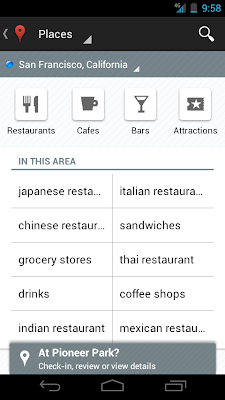
Redesigned Places home screen with popular searches for your area
To start using Google Maps 6.0 for Android, download the update from Android Market. This update works for Android OS 2.1+ devices everywhere Google Maps is currently available.
Posted by Chikai Ohazama, Product Management Director
Mapping the vast indoors
When you’re inside an airport, shopping mall, retail store, or other public space, Google Maps 6.0 for Android brings the freestanding map directory to the palm of your hands -- helping you determine where you are, what floor you're on, and where to go indoors. For example, in this busy travel season, you can use Google Maps 6.0 to help you find your way around airports.
Detailed floor plans automatically appear when you’re viewing the map and zoomed-in on a building where indoor map data is available. The familiar “blue dot” icon indicates your location within several meters, and when you move up or down a level in a building with multiple floors, the map will automatically update to display which floor you’re on.
See the full announcement for more details or to demo indoor Google Maps, start here.


Switching between features gets easier
When you open Google Maps for Android, you can do many things: view your location on the map, discover where to go with Places, get GPS turn-by-turn directions with Navigation, check in to share your location, and more. We wanted to make it easier to hop from one feature to another; so, we’ve added a drop-down menu to the top toolbar for quick access.

We hope this menu helps you get to your favorite parts of Google Maps faster or shows you some features you haven’t tried yet.
Discovering what’s great nearby with the new Places home screen
The new Places home screen includes popular searches for your current location, so you can find the best spots in any area you travel.

To start using Google Maps 6.0 for Android, download the update from Android Market. This update works for Android OS 2.1+ devices everywhere Google Maps is currently available.
Posted by Chikai Ohazama, Product Management Director
For many of us, the arrival of piles of catalogs marks the start of the holiday shopping season. But what if you could have all your favorite catalogs in one place, with the latest issues always available at your fingertips?
Starting today, Google Catalogs is available for Android tablets, as well as the iPad, giving you a new way to shop from the comfort of your couch. With rich product images, videos, and the ability to curate your own personal collages to share with friends, Google Catalogs makes browsing your favorite mail order catalogs easy, fun and interactive.
Google Catalogs features more than 125 brands you know and love like Nordstrom, Williams-Sonoma, Nike and Sephora. The app currently has over 400 digital catalog issues to browse across categories such as mens & women’s apparel, jewelry, gifts, gourmet, toys, kids, gadgets, sports & athletics and outdoor adventure.
Download the free Google Catalogs app for Android available in the US from Android Market or the iPad from the App Store today. To learn more, visit www.google.com/catalogs.

Posted by Abigail Holtz, Business Product Manager, Google Catalogs team
Caveman Cricket
CavemanCricket(176x208).jad
CavemanCricket(176x208).jar ( 174 KB )
CavemanCricket(240x320).jad
CavemanCricket(240x320).jar ( 194 KB )


CavemanCricket(176x208).jad
CavemanCricket(176x208).jar ( 174 KB )
CavemanCricket(240x320).jad
CavemanCricket(240x320).jar ( 194 KB )
Earlier this year, we introduced interactive weather information in mobile search results and now this feature is available in 33 more languages. Now when you search for ‘météo’, ‘tempo’, ‘날씨’, or ‘weather’ in your language, you’ll see the current temperature, humidity level and wind speed for your location. You’ll also get an overall forecast and the weather outlook for the next few days. To see weather conditions at various times throughout the day, move the slider across the next 12 hrs; that way you’ll know if you’ll need a light jacket in the afternoon or perhaps an umbrella in the evening.


Give it a try by searching Google for ‘weather’ in your language on your Android or iOS mobile device.
Posted by Sungjoon Jung, Software Engineer
Posted by Sungjoon Jung, Software Engineer
(Cross posted on the Inside Search Blog)
Today, we’re very pleased to be launching a significant redesign for the Google Search app for iPad. As you can see in our video, whether you’re doing research and comparing results, or exploring beautiful imagery, we have added new features to make the app more interactive, more visual and to help you find what you want more easily.
More interactive
You’ll notice that searching is faster and more interactive from your first keystroke. As soon as you begin to type, Google Instant starts to display results, so you don’t even need to press the search button.
Once you pick a web page to visit, you’ll see the page load on a new, slide-in pane that will layer over the search results. You can slide the pane to the right to get back to your search results, and even keep scrolling through the results as your web page is loading. This allows you to go back and forth from results to web pages quickly to get the information you are looking for.
Once you pick a web page to visit, you’ll see the page load on a new, slide-in pane that will layer over the search results. You can slide the pane to the right to get back to your search results, and even keep scrolling through the results as your web page is loading. This allows you to go back and forth from results to web pages quickly to get the information you are looking for.

View search results on the left and a web page on the right in the slide-in pane
More visual
Viewing image results in the app is now much more vivid. Tap on any image result to use the new image carousel, which lets beautiful images shine. You’ll see the image you selected expand, and you can easily swipe through the carousel to see other similar images.


Swipe through the image carousel
Often you may be looking to find something you have seen before again or are continuing research on a topic. But on a tablet, typing can be a challenge. That is why we have created a visual way to explore your search history. Swipe right to view snapshots of pages you’ve visited, stacked and organized by search term. You can also manage your search history from this new view.

See your past searches with a new, visual history
With this release, we also brought Instant Previews to the app so you can quickly compare web pages before you choose your result. Tapping on an icon in the top right of the screen brings you into a visual preview of the pages for your search result, easy to scroll through with the swipe of a finger.
Find easily
Finally, we added a few extra features that we hope will help you find what you want more easily.
After you’ve selected a result, a new tool helps you find exactly what you need within a web page. Tap the magnifying glass on the top right-hand corner to highlight the most relevant section of the page. You can recommend pages you like with the new +1 button, right next to the magnifying glass, and help others find relevant sites more easily as well.

After you’ve selected a result, a new tool helps you find exactly what you need within a web page. Tap the magnifying glass on the top right-hand corner to highlight the most relevant section of the page. You can recommend pages you like with the new +1 button, right next to the magnifying glass, and help others find relevant sites more easily as well.

Helpful tools while you search
We’ve also made it easier to find and use your favorite Google services like Google News, Calendar and more in the new Apps menu. Tap on an icon to quickly read an email in Gmail, or share a post on Google+ within the slide-in pane. When you slide the pane to the right, you’ll be right back to searching.

Easily find more Google services
The app is available worldwide for iPads with iOS 4.0+. Download it in the App Store and start enjoying a faster and more interactive experience now.
Posted by Daniel Fish, Software Engineer, Google Search app


Fruit Ninja
FruitNinja(128x160).jad
FruitNinja(128x160).jar ( 119 KB )
FruitNinja(176x220).jad
FruitNinja(176x220).jar ( 169 KB )
FruitNinja(240x320).jad
FruitNinja(240x320).jar ( 272 KB )


FruitNinja(128x160).jad
FruitNinja(128x160).jar ( 119 KB )
FruitNinja(176x220).jad
FruitNinja(176x220).jar ( 169 KB )
FruitNinja(240x320).jad
FruitNinja(240x320).jar ( 272 KB )
Puzzlings
Puzzlings(128x128).jad
Puzzlings(128x128).jar ( 140 KB )
Puzzlings(176x220).jad
Puzzlings(176x220).jar ( 215 KB )
Puzzlings(240x320).jad
Puzzlings(240x320).jar ( 330 KB )


Puzzlings(128x128).jad
Puzzlings(128x128).jar ( 140 KB )
Puzzlings(176x220).jad
Puzzlings(176x220).jar ( 215 KB )
Puzzlings(240x320).jad
Puzzlings(240x320).jar ( 330 KB )
Sola Rola
SolaRola(128x128).jad
SolaRola(128x128).jar ( 117 KB )
SolaRola(128x160).jad
SolaRola(128x160).jar ( 233 KB )
SolaRola(176x208).jad
SolaRola(176x208).jar ( 228 KB )
SolaRola(176x220).jad
SolaRola(176x220).jar ( 233 KB )
SolaRola(240x320).jad
SolaRola(240x320).jar ( 417 KB )


SolaRola(128x128).jad
SolaRola(128x128).jar ( 117 KB )
SolaRola(128x160).jad
SolaRola(128x160).jar ( 233 KB )
SolaRola(176x208).jad
SolaRola(176x208).jar ( 228 KB )
SolaRola(176x220).jad
SolaRola(176x220).jar ( 233 KB )
SolaRola(240x320).jad
SolaRola(240x320).jar ( 417 KB )