(cross-posted to Official Google Blog and Google Commerce Blog)

Today in our New York City office, along with Citi, MasterCard, First Data and Sprint, we gave a demo of Google Wallet, an app that will make your phone your wallet. You’ll be able to tap, pay and save using your phone and near field communication (NFC). We’re field testing Google Wallet now and plan to release it soon.


Today in our New York City office, along with Citi, MasterCard, First Data and Sprint, we gave a demo of Google Wallet, an app that will make your phone your wallet. You’ll be able to tap, pay and save using your phone and near field communication (NFC). We’re field testing Google Wallet now and plan to release it soon.
Google Wallet is a key part of our ongoing effort to improve shopping for both businesses and consumers. It’s aimed at making it easier for you to pay for and save on the goods you want, while giving merchants more ways to offer coupons and loyalty programs to customers, as well as bridging the gap between online and offline commerce.
Because Google Wallet is a mobile app, it will do more than a regular wallet ever could. You'll be able to store your credit cards, offers, loyalty cards and gift cards, but without the bulk. When you tap to pay, your phone will also automatically redeem offers and earn loyalty points for you. Someday, even things like boarding passes, tickets, ID and keys could be stored in Google Wallet.

At first, Google Wallet will support both Citi MasterCard and a Google Prepaid Card, which you’ll be able to fund with almost any payment card. From the outset, you’ll be able to tap your phone to pay wherever MasterCard PayPass is accepted. Google Wallet will also sync your Google Offers, which you’ll be able to redeem via NFC at participating SingleTap™ merchants, or by showing the barcode as you check out. Many merchants are working to integrate their offers and loyalty programs with Google Wallet.
With Google Wallet, we’re building an open commerce ecosystem, and we’re planning to develop APIs that will enable integration with numerous partners. In the beginning, Google Wallet will be compatible with Nexus S 4G by Google, available on Sprint. Over time, we plan on expanding support to more phones.
To learn more please visit our Google Wallet website at www.google.com/wallet.
This is just the start of what has already been a great adventure towards the future of mobile shopping. We’re incredibly excited and hope you are, too.
Posted by Rob von Behren and Jonathan Wall, Founding Engineers on Google Wallet
There are a few seats left for the afternoon trip to Cupertino on June 6th. If you're interested, go here.
As I write this, there are less than 15 seats, though, so if you want one, I suggest you hurry.
As I write this, there are less than 15 seats, though, so if you want one, I suggest you hurry.
(Cross posted from Google LatLong Blog)
We’ve made it easier to check in and out of places, rate various locations, and get transit information with Google Maps 5.5 for Android. This release adds ‘check in’ and ‘rate and review’ buttons to Place pages, the option to edit your home/work address for Latitude, and redesigned transit station pages.
Read below for more details about the new features, which we hope will improve your user experience, a topic we take very seriously as there are now more than 200 million users of Google Maps for mobile across platforms and devices worldwide.
New check-in and rating buttons added to Place pages
Now when you open a Place page from your mobile device, you can check in to places with Google Latitude or submit a rating or review by clicking on two new buttons at the top of the listing.
This past week I had the chance to explore the Computer History Museum during my visit to San Francisco from across the pond in London. Once nearby, I could quickly open the museum’s Place page and check in.
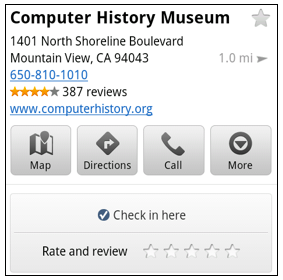 When I was ready to leave and head to lunch, in a few seconds I could go back to the Place page and rate the museum – which certainly earned the 5 star rating it received from me.
Update home and work address for your Latitude Location History
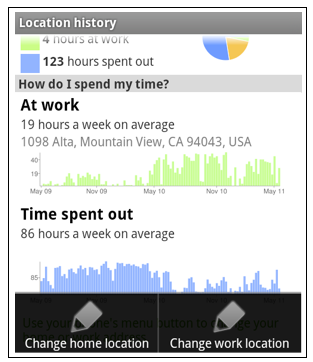
Last month we released the Location History dashboard for Latitude which estimates how much time you spend at home, work, and everywhere else. If your home or work address changes, or you’d rather set a different address to represent ‘home’ and ‘work,’ you can now edit these addresses within Latitude.
View the redesigned transit station pages
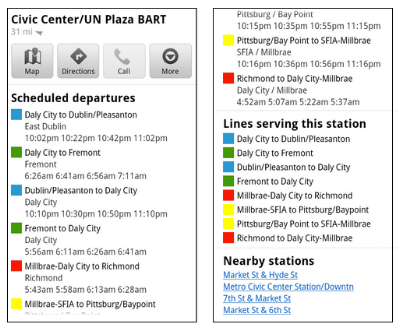
It’s been about two years since we added transit directions in Google Maps for Android. Since then, we’ve increased the coverage from 250 cities to more than 440 and counting - the most recent being Washington, D.C. To make it easier to plan your transit route, we updated the transit station pages in this release to better organize the information you need.
Each page now includes a list of upcoming scheduled departures for different lines, all the transit lines serving the station, and links to nearby transit stations.
Download Google Maps 5.5 for Android here to try out the new check-in and rating buttons, update your Latitude Location History home/work address, check out a transit station in a nearby city, or just make sure you have the latest version of Google Maps for Android. This update requires an Android OS 1.6+ device anywhere Google Maps is currently available. Learn more in our help center.
Posted by Luis Sigal, Software Engineer
We’ve made it easier to check in and out of places, rate various locations, and get transit information with Google Maps 5.5 for Android. This release adds ‘check in’ and ‘rate and review’ buttons to Place pages, the option to edit your home/work address for Latitude, and redesigned transit station pages.
Read below for more details about the new features, which we hope will improve your user experience, a topic we take very seriously as there are now more than 200 million users of Google Maps for mobile across platforms and devices worldwide.
New check-in and rating buttons added to Place pages
Now when you open a Place page from your mobile device, you can check in to places with Google Latitude or submit a rating or review by clicking on two new buttons at the top of the listing.
This past week I had the chance to explore the Computer History Museum during my visit to San Francisco from across the pond in London. Once nearby, I could quickly open the museum’s Place page and check in.
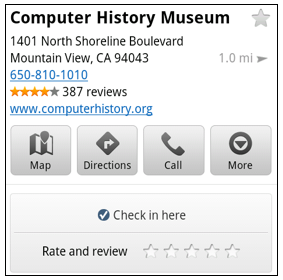 When I was ready to leave and head to lunch, in a few seconds I could go back to the Place page and rate the museum – which certainly earned the 5 star rating it received from me.
Update home and work address for your Latitude Location History
Last month we released the Location History dashboard for Latitude which estimates how much time you spend at home, work, and everywhere else. If your home or work address changes, or you’d rather set a different address to represent ‘home’ and ‘work,’ you can now edit these addresses within Latitude.

Change home/work location from Location History dashboard
View the redesigned transit station pages
It’s been about two years since we added transit directions in Google Maps for Android. Since then, we’ve increased the coverage from 250 cities to more than 440 and counting - the most recent being Washington, D.C. To make it easier to plan your transit route, we updated the transit station pages in this release to better organize the information you need.
Each page now includes a list of upcoming scheduled departures for different lines, all the transit lines serving the station, and links to nearby transit stations.

Download Google Maps 5.5 for Android here to try out the new check-in and rating buttons, update your Latitude Location History home/work address, check out a transit station in a nearby city, or just make sure you have the latest version of Google Maps for Android. This update requires an Android OS 1.6+ device anywhere Google Maps is currently available. Learn more in our help center.
Posted by Luis Sigal, Software Engineer
Just to let you all know, we're down to eleven remaining available seats on the third and last bus, and they're about equally split between morning and afternoon. If you missed getting a seat on the first two buses, and haven't filled out the interest form for the third, there probably won't be a seat.So, go here now to tell us you're interested in one of the remaining seats. Speak now or forever hold your peace.
(Cross-posted from the Google Lat Long Blog)
With 40% of Google Maps usage on mobile devices, we want you to have a consistent Google Maps experience wherever you use it. So, today we’re announcing our updated Google Maps experience for mobile browsers on Android and iOS.
Now, when you visit maps.google.com on your phone or tablet’s browser and opt-in to share your location, you can use many of the same Google Maps features you’re used to from the desktop. This will allow you to: This past weekend, I was at a team off-site at a ropes course and needed to find a good deli spot to grab lunch. I opened Google Maps on my mobile browser and searched to locate a popular deli nearby. A few finger taps later, I had viewed photos and reviews on the deli’s Place page and found the quickest way to get there using driving directions- all from my mobile browser.

Google Maps for mobile browsers is platform independent - you will always get a consistent experience and the latest features without needing to install any updates, no matter what phone you use.
To get started exploring Google Maps in your mobile browser, go to http://maps.google.com or any domain where Google Maps is available. Learn more in our help center.
Posted by Alireza Ali, Software Engineer
With 40% of Google Maps usage on mobile devices, we want you to have a consistent Google Maps experience wherever you use it. So, today we’re announcing our updated Google Maps experience for mobile browsers on Android and iOS.
Now, when you visit maps.google.com on your phone or tablet’s browser and opt-in to share your location, you can use many of the same Google Maps features you’re used to from the desktop. This will allow you to:
- See your current location
- Search for what’s nearby with suggest and auto complete
- Have clickable icons of popular businesses and transit stations
- Get driving, transit, biking, and walking directions
- Turn on satellite, transit, traffic, biking, and other layers
- View Place pages with photos, ratings, hours, and more
- When signed into your Google account, access your starred locations and My Maps
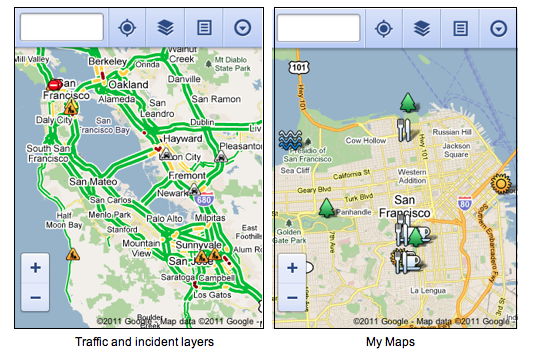 This past weekend, I was at a team off-site at a ropes course and needed to find a good deli spot to grab lunch. I opened Google Maps on my mobile browser and searched to locate a popular deli nearby. A few finger taps later, I had viewed photos and reviews on the deli’s Place page and found the quickest way to get there using driving directions- all from my mobile browser.
To get started exploring Google Maps in your mobile browser, go to http://maps.google.com or any domain where Google Maps is available. Learn more in our help center.
The good news:
The additional bus is a go! We'll be opening up payment for those seats this weekend to people who signed the interest form, and then opening it up to the public 24 hours later until seats are gone. The third bus will leave Moscone a bit later than the other two (11:30 and 3:45),but will not stop at SFO. If you're interested in the additional bus, but need to be picked up at SFO, drop me an e-mail (jeff at martiancraft dot com) or send me a tweet, and we'll see if we can find a way to accommodate you by shuffling a few seats. Update: The third bus will stop at SFO!.
The bad news:
There will not be another bus once we fill this one. We're already threatening to overflow both The Company Store and BJ's, a fourth bus would be overkill even if we were sure we could fill it, which I'm not at all sure we could do anyway.As of right now, there are approximately 25 spaces left on the third and final bus.
The interest form will remain open until we either run out of seats, or we open up the reservation payment again. People who signed up on interest form get dibs on the remaining seats.One final note: last year, we had some people show up without signing up in advance. Please don't do that this year. Simply put, we won't have any place to put you. The bus company won't let people stand while the bus is driving, so if you're interested in going, you've got to reverse a seat in advance.
The additional bus is a go! We'll be opening up payment for those seats this weekend to people who signed the interest form, and then opening it up to the public 24 hours later until seats are gone. The third bus will leave Moscone a bit later than the other two (11:30 and 3:45),
The bad news:
There will not be another bus once we fill this one. We're already threatening to overflow both The Company Store and BJ's, a fourth bus would be overkill even if we were sure we could fill it, which I'm not at all sure we could do anyway.As of right now, there are approximately 25 spaces left on the third and final bus.
The interest form will remain open until we either run out of seats, or we open up the reservation payment again. People who signed up on interest form get dibs on the remaining seats.One final note: last year, we had some people show up without signing up in advance. Please don't do that this year. Simply put, we won't have any place to put you. The bus company won't let people stand while the bus is driving, so if you're interested in going, you've got to reverse a seat in advance.
The Guide to the App Galaxy, which we showed off last week at Google I/O, is designed to help mobile app developers—regardless of platform—navigate the complexities of launching an app and building a business on mobile. As you maneuver through the "galaxy” using the arrow keys on your keyboard, you’ll get the basics about app promotion, monetization and measurement—with tips from Google as well as successful developers. Read more on the Official Google Blog.
Post content by Lauren Usui, Product Marketing Manager
Post content by Lauren Usui, Product Marketing Manager
Okay, here's the deal folks. We're trying to find out from the bus company what are options are. In the meantime, we need to know how many of you are interested in a seat on the bus. If you want to go, and didn't get a seat, you need to go fill out this form right now.If we get enough interest to cover the cost of another bus, we'll then send you all information on how to pay for your seats. Spread the word, because we really don't want anybody to get left behind if at all possible.
Okay, I'm just about to head to bed, but wanted to let you know that we've officially sold out all four bus trips for the June 5 pilgrimage. Scott and I are going to regroup in the morning and see what our options are for adding capacity.Because we have to pay for buses by the day and not per trip, we have to be sure we can fill two more bus trips in order to cover the cost of adding an additional bus. We're also going to see if adding a smaller bus is a possibility and how that would impact the per-seat price.Whatever we do, I'll post about it here and also tweet it. But not until tomorrow.G'night.
If you signed the interest form, you should have received an e-mail telling you how to reserve seats on the pilgrimage buses. If you did sign the earlier form but didn't get an e-mail, let me know.If you didn't sign the interest sheet, don't worry, we'll be opening registration up to the public tomorrow. We thought it only fair to give the people who signed up in advance a bit of a head start.We should have enough room for everybody, as we're able to add additional buses if we need more capacity. We just have to make sure that we have enough additional people to cover the cost of another bus.Keep an eye here or follow me on twitter to find out when we open registration up to everyone else.
Two months ago, we launched a redesign of the Google Search app for iOS. We were happy that many of you liked the new look and interactivity of the app. However, we also heard your feedback about the app’s speed. Today we’re introducing changes that make the app more responsive as well as other visual changes that make search results even easier to read.
Faster app performance
This version of Google Search app is up to 20% more responsive as you type search queries and interact with it. As part of the speed improvements, a feature called “Just Talk” will now be off by default. Just Talk allowed you to search via voice just by bringing the phone to your ear and speaking rather than tapping the microphone icon. Turning off this feature may improve app performance, though you can easily re-enable it under the Settings > Voice Search menu.

Improved look & feel for search results
When searching on a phone, the small screen sometimes makes it difficult to read small fonts or to tap precisely on a link. To help you read and tap with ease, we’ve made the font of our search results bigger and the entire search result is now a tap target rather than just the link.


Thank you for your feedback. Please continue to let us know how we can improve your experience by going to Settings > Help and Feedback > Feedback.
Google Search app is available for devices running iOS 3.0 and above. Download it from the App Store or by scanning the QR code below:

Posted by Nirav Savjani, Software Engineer
Faster app performance
This version of Google Search app is up to 20% more responsive as you type search queries and interact with it. As part of the speed improvements, a feature called “Just Talk” will now be off by default. Just Talk allowed you to search via voice just by bringing the phone to your ear and speaking rather than tapping the microphone icon. Turning off this feature may improve app performance, though you can easily re-enable it under the Settings > Voice Search menu.

Turn Just Talk on or off
Improved look & feel for search results
When searching on a phone, the small screen sometimes makes it difficult to read small fonts or to tap precisely on a link. To help you read and tap with ease, we’ve made the font of our search results bigger and the entire search result is now a tap target rather than just the link.


See the difference between previous (left) and new interface (right) with results now easier to read and select
Thank you for your feedback. Please continue to let us know how we can improve your experience by going to Settings > Help and Feedback > Feedback.
Google Search app is available for devices running iOS 3.0 and above. Download it from the App Store or by scanning the QR code below:

Posted by Nirav Savjani, Software Engineer
One thing that I get asked about a lot is whether you should use a game or graphics engine instead of learning OpenGL ES. Often, these emails are prefaced by a statement about how hard graphics programming. I've had to answer this question enough times now that it seems like a good topic for a blog post.
Honestly, I find it kind of hard to answer, because I don't see the "using an engine" and "learning graphics programming" as being distinct or mutually exclusive approaches. While a good game or graphics engine will handle a lot of the more gnarly programming tasks for you and shorten your development time, you still need to understand the underlying concepts to build anything of any complexity.
All of these engines are built on top of OpenGL (and/or DirectX if they support Windows), and are subject to the same limitations and strengths. Not understanding, at least at some level, how these lower-level graphics libraries work and the basic maths of 3D programming will eventually hold you back.
But… that doesn't necessarily mean you need to learn OpenGL before you can start using these tools effectively. You don't. It's just that some of the difficult, sticky math and concepts that might be scaring you away from OpenGL are still there (though better hidden), and you may well still have to deal with them at some point if you're doing the coding on the game (as opposed to just creating assets or doing level design).
Here's kind of a simple nutshell rule:
So, when shouldn't you use an existing engine if your goal is to make a game and not to try and be the next John Carmack? Almost never. Rolling your own game engine should be a labor of love. It's got to be an itch you can't scratch; the kind of desire that I probably couldn't talk you out of anyway. Otherwise, it's just a waste of your time.
What about when there just isn't an engine that works for what you want to do?
Honestly, that's not all that likely in this day and age, but even if it is, you're far better off starting with an existing engine and then modifying it to meet your needs.
From a business and financial perspective, it's almost never better to start from scratch. Even many of the AAA commercial game engines are derivatives of other engines. To give an example: Valve's Source Engine, is derived from their older Goldsource Engine, which itself was forked from the Quake Engine back around 1996.
Though there are quite a few game engines around, a very large percentage of high-end commercial games, both console and PC, are based on either the Unreal engine or the Quake engine or one of their derivatives. If you throw in a handful of other engines, like the CryEngine, you've probably covered all but a few outliers.
If it's not cost effective for large, multi-person development teams with multi-million dollar budgets to develop their own game engines, it's probably not the best choice for individual indie developers or small shops.
So, don't reinvent the wheel. Use an engine and stand on the shoulders of John Carmack and others like him. Don't spend your time trying to solve problems that are long-solved. Just be aware that using an engine can't completely eliminate the need to learn a little math or to understand the underlying concepts.
I won't be discussing the UDK, even though it's a phenomenal engine, because it requires using Windows for many tasks, and I don't want to spend time in Windows. If you've got both a Mac and a Windows machine, however, and don't mind splitting time between OS X and Windows, you might want to check it out. A lot of time and brainpower has gone into getting the UDK to have incredible performance on iOS and the license terms have been changed to be much more friendly to small indie shops ($99 plus 25% of royalties after the first $50,000).
Honestly, I find it kind of hard to answer, because I don't see the "using an engine" and "learning graphics programming" as being distinct or mutually exclusive approaches. While a good game or graphics engine will handle a lot of the more gnarly programming tasks for you and shorten your development time, you still need to understand the underlying concepts to build anything of any complexity.
All of these engines are built on top of OpenGL (and/or DirectX if they support Windows), and are subject to the same limitations and strengths. Not understanding, at least at some level, how these lower-level graphics libraries work and the basic maths of 3D programming will eventually hold you back.
But… that doesn't necessarily mean you need to learn OpenGL before you can start using these tools effectively. You don't. It's just that some of the difficult, sticky math and concepts that might be scaring you away from OpenGL are still there (though better hidden), and you may well still have to deal with them at some point if you're doing the coding on the game (as opposed to just creating assets or doing level design).
Here's kind of a simple nutshell rule:
If you love graphics programming or are fascinated by it, then study OpenGL ES and the underlying maths and forget about using the engines at first (though studying their source is a great way to learn). There's always going to be work for good graphics programmers and you can't put a price tag on doing what you love.
If, on the other hand, your goal is to make a game or other graphics-heavy application, and graphics programming is just a means to that end, then use an engine, because it will shorten the amount of work you have to do tremendously, which inherently increases your chances of making money because time is money and there's never enough of it.
So, when shouldn't you use an existing engine if your goal is to make a game and not to try and be the next John Carmack? Almost never. Rolling your own game engine should be a labor of love. It's got to be an itch you can't scratch; the kind of desire that I probably couldn't talk you out of anyway. Otherwise, it's just a waste of your time.
What about when there just isn't an engine that works for what you want to do?
Honestly, that's not all that likely in this day and age, but even if it is, you're far better off starting with an existing engine and then modifying it to meet your needs.
From a business and financial perspective, it's almost never better to start from scratch. Even many of the AAA commercial game engines are derivatives of other engines. To give an example: Valve's Source Engine, is derived from their older Goldsource Engine, which itself was forked from the Quake Engine back around 1996.
Though there are quite a few game engines around, a very large percentage of high-end commercial games, both console and PC, are based on either the Unreal engine or the Quake engine or one of their derivatives. If you throw in a handful of other engines, like the CryEngine, you've probably covered all but a few outliers.
If it's not cost effective for large, multi-person development teams with multi-million dollar budgets to develop their own game engines, it's probably not the best choice for individual indie developers or small shops.
So, don't reinvent the wheel. Use an engine and stand on the shoulders of John Carmack and others like him. Don't spend your time trying to solve problems that are long-solved. Just be aware that using an engine can't completely eliminate the need to learn a little math or to understand the underlying concepts.
Engines
It just so happens that for a number of proposals I've done lately, I've been looking at game engines in some depth. I'm not going to do "reviews" per se, but over the next few weeks, I will try and post my thoughts about several of the engines available for iOS, including Unity3D, Sio2, Ogre3D, and Cocos3D.I won't be discussing the UDK, even though it's a phenomenal engine, because it requires using Windows for many tasks, and I don't want to spend time in Windows. If you've got both a Mac and a Windows machine, however, and don't mind splitting time between OS X and Windows, you might want to check it out. A lot of time and brainpower has gone into getting the UDK to have incredible performance on iOS and the license terms have been changed to be much more friendly to small indie shops ($99 plus 25% of royalties after the first $50,000).
(Cross-posted from the Google News blog)
Google News for mobile lets you keep up with the latest news, wherever you are. Today we’re excited to announce a new feature in the U.S. English edition called “News near you” that surfaces news relevant to the city you’re in and surrounding areas.
Location-based news first became available in Google News in 2008, and today there’s a local section for just about any city, state or country in the world with coverage from thousands of sources. We do local news a bit differently, analyzing every word in every story to understand what location the news is about and where the source is located.
Now you can find local news on your smartphone. Here’s an example of a “News near you” mobile section automatically created for someone in Topeka, Kansas:

To use this feature, visit Google News from the browser of your Android smartphone or iPhone. If this is the first time you are visiting Google News on your phone since this feature became available, a pop-up will ask you if you want to share your location. If you say yes, news relevant to your location will appear in a new section called “News near you” which will be added at the bottom of the homepage. You can reorganize the sections later via the personalization page.

You can turn off the feature at any time either by hiding the section in your personalization settings or by adjusting your mobile browser settings. Please visit the Help Center for further details.
So, go to news.google.com from your smartphone and get the latest news from wherever you are.
Posted by Navneet Singh, Product Manager, Google News
Google News for mobile lets you keep up with the latest news, wherever you are. Today we’re excited to announce a new feature in the U.S. English edition called “News near you” that surfaces news relevant to the city you’re in and surrounding areas.
Location-based news first became available in Google News in 2008, and today there’s a local section for just about any city, state or country in the world with coverage from thousands of sources. We do local news a bit differently, analyzing every word in every story to understand what location the news is about and where the source is located.
Now you can find local news on your smartphone. Here’s an example of a “News near you” mobile section automatically created for someone in Topeka, Kansas:

To use this feature, visit Google News from the browser of your Android smartphone or iPhone. If this is the first time you are visiting Google News on your phone since this feature became available, a pop-up will ask you if you want to share your location. If you say yes, news relevant to your location will appear in a new section called “News near you” which will be added at the bottom of the homepage. You can reorganize the sections later via the personalization page.

You can turn off the feature at any time either by hiding the section in your personalization settings or by adjusting your mobile browser settings. Please visit the Help Center for further details.
So, go to news.google.com from your smartphone and get the latest news from wherever you are.
Posted by Navneet Singh, Product Manager, Google News
We’ve seen tremendous growth in Android Market lately. With over 200,000 apps supporting over 300 Android devices, we’ve had 4.5 billion applications installed to date. But with so many apps available, how do you find the ones you really want? Whether you’re looking for the most popular apps, hot new apps, or just the very best apps available, we want to help make sure that you find what you’re looking for.
Today, we’re excited to announce 5 new features for Android Market focused on helping you find apps you’ll love.


We hope you find these features helpful as you explore the many greats apps available on Android Market. These new features are available now on http://market.android.com, and will be coming soon to Android Market on phones and tablets.
Posted by Fernando Delgado, Product Manager, Android Market
Today, we’re excited to announce 5 new features for Android Market focused on helping you find apps you’ll love.
- New top app charts - We’ve revamped our top app charts to be fresher and country-specific, so you get the most current, relevant results. We’ve also added top new free, top new paid, and top grossing lists, all right on the Android Market home page.
- Editors’ Choice -
- Top Developers - We’re also recognizing those developers creating the highest quality, most popular, and most notable apps available on Android Market. They’ll get a special icon on our Android Market website, appearing wherever the developer name is shown, starting today for an initial set of over 150 developers.
- Better related apps - On the left side of an app page, you’ll now see two groups of related apps: apps frequently browsed by people who viewed this app, and apps that people tend to install alongside this app. For example, people who view ScoreMobile, my favorite sports score app, often also view other sports score apps, while those who install ScoreMobile tend to also install apps for specific sports leagues or teams. We’ll also show you related apps once you decide to install an app.
- Trending apps - Finally, we’ve added a new section to the Android Market homepage showing trending apps – those apps that are quickly growing in daily installs. Look here to stay ahead of the curve and find new apps as they get hot.
(Cross-posted from the Code Blog)
In less than 24 hours, we’ll be kicking off Google I/O 2011, our annual developer conference here in San Francisco. This year’s keynote presentations will highlight the biggest opportunities for developers and feature two of our most popular and important developer platforms: Android and Chrome. Google engineers from Andy Rubin and Sundar Pichai’s teams will unveil new features, preview upcoming updates, and provide new insights into the growing momentum behind these platforms.
Plus, for the first time in Google I/O history, you’ll be able to join us throughout the two days at I/O Live. We’ll live stream the two keynote presentations, two full days of Android and Chrome technical sessions, and the After Hours party. Recorded videos from all sessions across eight product tracks will be available within 24 hours after the conference. Whether you’ll be joining us in San Francisco or from the farthest corner of the world, bookmark www.google.com/io and check back on May 10 at 9:00 a.m. PDT for a fun treat as we count down to 00:00:00:00.
Posted by Vic Gundotra, Senior Vice President of Engineering
In less than 24 hours, we’ll be kicking off Google I/O 2011, our annual developer conference here in San Francisco. This year’s keynote presentations will highlight the biggest opportunities for developers and feature two of our most popular and important developer platforms: Android and Chrome. Google engineers from Andy Rubin and Sundar Pichai’s teams will unveil new features, preview upcoming updates, and provide new insights into the growing momentum behind these platforms.
Plus, for the first time in Google I/O history, you’ll be able to join us throughout the two days at I/O Live. We’ll live stream the two keynote presentations, two full days of Android and Chrome technical sessions, and the After Hours party. Recorded videos from all sessions across eight product tracks will be available within 24 hours after the conference. Whether you’ll be joining us in San Francisco or from the farthest corner of the world, bookmark www.google.com/io and check back on May 10 at 9:00 a.m. PDT for a fun treat as we count down to 00:00:00:00.
Posted by Vic Gundotra, Senior Vice President of Engineering
Since its launch, we have worked to make Google Goggles faster and more accurate when returning search results for a wide variety of images. Today, we are taking several steps to make Goggles a better and more personal experience. Goggles 1.4 for Android devices introduces an enhanced search history experience, the ability to suggest better results to Google if we are not able to accurately match your image, and improved business card recognition.
Enhanced search history
The new search history experience lets you search your Goggles results, make personal notes on specific results and share your results with friends. When you add a personal note to a Goggles result, the note will appear in your search history. I’m trying to learn more about wine, so when I taste something new, it’s easy for me to add a note to help me remember what I liked about the wine. Later, I can search my search history for words in my note to help me find that bottle that went so well with steak. Read more about how to enable search history for Goggles here.


Notes are intended to help you better organize your search history, so if you choose to share a result with a friend, your notes will not be shared. However, you can always add a personalized message to your friend when you share your results with them.


Suggest a better result
We are constantly working to improve the accuracy of Goggles at recognizing certain categories of items, but visual recognition is still a complicated task. With Goggles 1.4, you are now able to suggest a better result when Goggles cannot find an image match, or the quality of the result is poor.
To send your suggestion to Google, tap “Can you suggest a better result?” on the results page. You can then select the relevant part of the image and submit a tag. Tags will be used to improve recognition in object categories where Goggles already provides some results, like artwork or wine bottles.


Improved business card recognition
Business card recognition is one of the most popular uses of Google Goggles, so we're rolling out some new updates to make the experience even quicker and easier. Additionally, instead of simply recognizing the content as text, Goggles now recognizes the information as a contact, making it easier to add to your phone's contact list.


Google Goggles is available for Android 1.6+ devices. Download it by visiting Android Market or by scanning the QR code below:
Posted by Jacob Smullyan, Software Engineer
Enhanced search history
The new search history experience lets you search your Goggles results, make personal notes on specific results and share your results with friends. When you add a personal note to a Goggles result, the note will appear in your search history. I’m trying to learn more about wine, so when I taste something new, it’s easy for me to add a note to help me remember what I liked about the wine. Later, I can search my search history for words in my note to help me find that bottle that went so well with steak. Read more about how to enable search history for Goggles here.


To make a personal note, tap the pencil in the corner when viewing a search result.
Notes are intended to help you better organize your search history, so if you choose to share a result with a friend, your notes will not be shared. However, you can always add a personalized message to your friend when you share your results with them.


Share a result by sending a link to your friends.
Suggest a better result
We are constantly working to improve the accuracy of Goggles at recognizing certain categories of items, but visual recognition is still a complicated task. With Goggles 1.4, you are now able to suggest a better result when Goggles cannot find an image match, or the quality of the result is poor.
To send your suggestion to Google, tap “Can you suggest a better result?” on the results page. You can then select the relevant part of the image and submit a tag. Tags will be used to improve recognition in object categories where Goggles already provides some results, like artwork or wine bottles.


When suggesting a better result, you can crop the image and add a description.
Improved business card recognition
Business card recognition is one of the most popular uses of Google Goggles, so we're rolling out some new updates to make the experience even quicker and easier. Additionally, instead of simply recognizing the content as text, Goggles now recognizes the information as a contact, making it easier to add to your phone's contact list.


Call or add the person directly as a contact
Google Goggles is available for Android 1.6+ devices. Download it by visiting Android Market or by scanning the QR code below:
Posted by Jacob Smullyan, Software Engineer


Cross-posted from the Official Google Blog
When we launched Google Earth in 2005, most of us were still using flip phones. At the time, the thought of being able to cart around 197 million square miles of Earth in your pocket was still a distant dream. Last year, that dream came to fruition for Android users when we released Google Earth for Android. With the recent release of tablets based on Android 3.0, we wanted to take full advantage of the large screens and powerful processors that this exciting new breed of tablets had to offer.
Today’s update to Google Earth for Android makes Earth look better than ever on your tablet. We’ve added support for fully textured 3D buildings, so your tour through the streets of Manhattan will look more realistic than ever. There’s also a new action bar up top, enabling easier access to search, the option to “fly to your location” and layers such as Places, Panoramio photos, Wikipedia and 3D buildings.
Moving from a mobile phone to a tablet was like going from a regular movie theatre to IMAX. We took advantage of the larger screen size, including features like content pop-ups appearing within Earth view, so you can see more information without switching back and forth between pages.
One of my favorite buildings to fly around in Google Earth has always been the Colosseum in Rome, Italy:
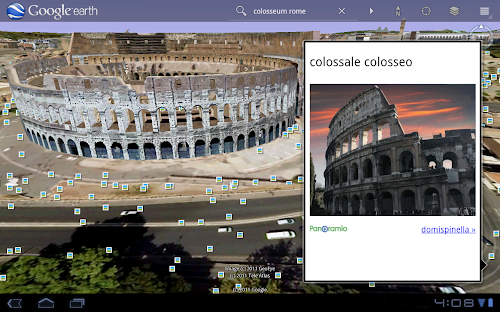
With the larger tablet screen, I can fly around the 3D Colosseum while also browsing user photos from Panoramio. The photos pop up within the imagery so I can interact with them without losing sight of the Colosseum and its surroundings. Also, by clicking on the layer button on the action bar, I can choose which layers I want to browse.
This version is available for devices with Android 2.1 and above. The new tablet design is available for devices with Android 3.0 (Honeycomb) and above. Please visit the Google Earth help center for more information.
To download or update Google Earth, head to m.google.com/earth in your device’s browser or visit Android Market. Enjoy a whole new world of Google Earth for tablets!
Posted by Peter Birch, Product Manager
When we launched Google Earth in 2005, most of us were still using flip phones. At the time, the thought of being able to cart around 197 million square miles of Earth in your pocket was still a distant dream. Last year, that dream came to fruition for Android users when we released Google Earth for Android. With the recent release of tablets based on Android 3.0, we wanted to take full advantage of the large screens and powerful processors that this exciting new breed of tablets had to offer.
Today’s update to Google Earth for Android makes Earth look better than ever on your tablet. We’ve added support for fully textured 3D buildings, so your tour through the streets of Manhattan will look more realistic than ever. There’s also a new action bar up top, enabling easier access to search, the option to “fly to your location” and layers such as Places, Panoramio photos, Wikipedia and 3D buildings.
Moving from a mobile phone to a tablet was like going from a regular movie theatre to IMAX. We took advantage of the larger screen size, including features like content pop-ups appearing within Earth view, so you can see more information without switching back and forth between pages.
One of my favorite buildings to fly around in Google Earth has always been the Colosseum in Rome, Italy:

With the larger tablet screen, I can fly around the 3D Colosseum while also browsing user photos from Panoramio. The photos pop up within the imagery so I can interact with them without losing sight of the Colosseum and its surroundings. Also, by clicking on the layer button on the action bar, I can choose which layers I want to browse.
This version is available for devices with Android 2.1 and above. The new tablet design is available for devices with Android 3.0 (Honeycomb) and above. Please visit the Google Earth help center for more information.
To download or update Google Earth, head to m.google.com/earth in your device’s browser or visit Android Market. Enjoy a whole new world of Google Earth for tablets!
Posted by Peter Birch, Product Manager
Jacques De Schepper sent in an updated version of my old Empty OpenGL ES Application Template, updated to use Xcode 4's completely revamped templating mechanism. You can download the new Xcode 4 version of the template right here. I haven't had a chance yet to test this out, but once I do, I'll also add it to GitHub.Thanks, Jacques!
Cross-posted from the Google Voice Blog.
It’s official, the Google Voice integration with Sprint is now live!
As we mentioned when we first announced the integration, there are two ways to bring Google Voice to your Sprint mobile phone:
Option 1: Keep your Sprint number: Your Sprint number becomes your Google Voice number so that when people call your Sprint mobile number, it rings all the phones you want.
Option 2: Replace your Sprint number with your Google Voice number: All calls made and texts sent from your Sprint phone will display your Google Voice number.
In both cases, Google Voice replaces Sprint voicemail and international calls made from the Sprint phone will be connected by Google Voice.
For detailed instructions on how to get started with either option, visit google.com/voice/sprint.
This integration is currently only available to Sprint customers in the United States.
Posted by Patrick Moor, Software Engineer
It’s official, the Google Voice integration with Sprint is now live!
As we mentioned when we first announced the integration, there are two ways to bring Google Voice to your Sprint mobile phone:
Option 1: Keep your Sprint number: Your Sprint number becomes your Google Voice number so that when people call your Sprint mobile number, it rings all the phones you want.
Option 2: Replace your Sprint number with your Google Voice number: All calls made and texts sent from your Sprint phone will display your Google Voice number.
In both cases, Google Voice replaces Sprint voicemail and international calls made from the Sprint phone will be connected by Google Voice.
For detailed instructions on how to get started with either option, visit google.com/voice/sprint.
This integration is currently only available to Sprint customers in the United States.
Posted by Patrick Moor, Software Engineer
Just wanted to give you all an update on the bus pilgrimage to Cupertino on June 5th. We had a tremendous show of interest. Approximately 300 people expressed an interest, plus several people tweeted and e-mailed after the interest form was closed down. Last year, we took 100 people.
Scott Knaster is investigating bus options, including a possible bus directly from SFO to the Apple Store and then up to WWDC for people who wouldn't be able to get up to San Francisco in time for the bus.
We'll start the official signups the middle of this month, once all the arrangements are squared away and we know how many seats there will be. Once the arrangements are made, the seats will be made available on a first-come, first-served basis. If you filled out the interest form, you'll get an e-mail with details of how to reserve your seat and pay for it as soon as signup opens. If you didn't fill out the interest form, you probably want to follow me or Scott on Twitter, as we'll tweet when the signups start and then periodically re-tweet until the seats are gone.
I want to set expectations, especially for first timers. The only thing open at Apple HQ will be The Company Store, which is similar to an Apple Store, but with a lot of Apple schwag and paraphernalia (t-shirts, pens, mugs, sweatshirts, etc). Being not just a Sunday, but the Sunday before WWDC, don't expect to see many Apple employees coming and going, and you will definitely not be able to get into the quad (the inside portion of One Infinite Loop). There is no official Apple recognition of this trip, and we don't have any expectation that there will be.
In the parking lot near The Company Store, there is a restaurant called BJ's, affectionately referred to as "IL7" by Apple employees (the buildings at One Infinite Loop are named IL1 through IL6), which is fairly good for what it is. You can have lunch or a drink there, but if you do, I advise you to order quickly and have your check brought with your food. Since the same bus will be used for multiple trips, we won't be able to wait for stragglers. The bus will leave at the scheduled departure time with or without you. We didn't leave anybody behind last year, but we had one table that cut it awfully, awfully close. It's an awfully long damn walk back to San Francisco, and they get pretty busy on Sundays even without a bus full of additional customers.
Lastly, if you see Scott on Sunday, make sure to say a big thank you to him. Scott has done nearly all of the legwork again this year and the trip is happening very much because of him, so thanks Scott!
Scott Knaster is investigating bus options, including a possible bus directly from SFO to the Apple Store and then up to WWDC for people who wouldn't be able to get up to San Francisco in time for the bus.
We'll start the official signups the middle of this month, once all the arrangements are squared away and we know how many seats there will be. Once the arrangements are made, the seats will be made available on a first-come, first-served basis. If you filled out the interest form, you'll get an e-mail with details of how to reserve your seat and pay for it as soon as signup opens. If you didn't fill out the interest form, you probably want to follow me or Scott on Twitter, as we'll tweet when the signups start and then periodically re-tweet until the seats are gone.
I want to set expectations, especially for first timers. The only thing open at Apple HQ will be The Company Store, which is similar to an Apple Store, but with a lot of Apple schwag and paraphernalia (t-shirts, pens, mugs, sweatshirts, etc). Being not just a Sunday, but the Sunday before WWDC, don't expect to see many Apple employees coming and going, and you will definitely not be able to get into the quad (the inside portion of One Infinite Loop). There is no official Apple recognition of this trip, and we don't have any expectation that there will be.
In the parking lot near The Company Store, there is a restaurant called BJ's, affectionately referred to as "IL7" by Apple employees (the buildings at One Infinite Loop are named IL1 through IL6), which is fairly good for what it is. You can have lunch or a drink there, but if you do, I advise you to order quickly and have your check brought with your food. Since the same bus will be used for multiple trips, we won't be able to wait for stragglers. The bus will leave at the scheduled departure time with or without you. We didn't leave anybody behind last year, but we had one table that cut it awfully, awfully close. It's an awfully long damn walk back to San Francisco, and they get pretty busy on Sundays even without a bus full of additional customers.
Lastly, if you see Scott on Sunday, make sure to say a big thank you to him. Scott has done nearly all of the legwork again this year and the trip is happening very much because of him, so thanks Scott!