Google Maps for mobile had its sixth birthday earlier this month and we’re celebrating by releasing the next generation of Google Maps for Android, which is first to get indoor Google Maps—announced moments ago on the Official Google Blog. We also have two other great additions in this release: a new way to switch between features in the toolbar and a new Places home screen.
Mapping the vast indoors
When you’re inside an airport, shopping mall, retail store, or other public space, Google Maps 6.0 for Android brings the freestanding map directory to the palm of your hands -- helping you determine where you are, what floor you're on, and where to go indoors. For example, in this busy travel season, you can use Google Maps 6.0 to help you find your way around airports.
Detailed floor plans automatically appear when you’re viewing the map and zoomed-in on a building where indoor map data is available. The familiar “blue dot” icon indicates your location within several meters, and when you move up or down a level in a building with multiple floors, the map will automatically update to display which floor you’re on.
See the full announcement for more details or to demo indoor Google Maps, start here.

Mall of America in Minneapolis before and after, with a floor selector

San Francisco International Airport before and after, with 3D tilt
Switching between features gets easier
When you open Google Maps for Android, you can do many things: view your location on the map, discover where to go with Places, get GPS turn-by-turn directions with Navigation, check in to share your location, and more. We wanted to make it easier to hop from one feature to another; so, we’ve added a drop-down menu to the top toolbar for quick access.

New drop down menu to switch between features
We hope this menu helps you get to your favorite parts of Google Maps faster or shows you some features you haven’t tried yet.
Discovering what’s great nearby with the new Places home screen
The new Places home screen includes popular searches for your current location, so you can find the best spots in any area you travel.
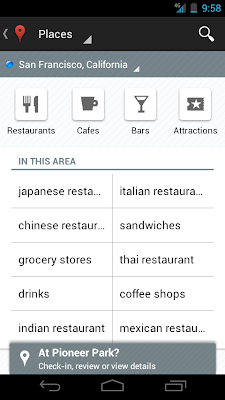
Redesigned Places home screen with popular searches for your area
To start using Google Maps 6.0 for Android, download the update from Android Market. This update works for Android OS 2.1+ devices everywhere Google Maps is currently available.
Posted by Chikai Ohazama, Product Management Director
Mapping the vast indoors
When you’re inside an airport, shopping mall, retail store, or other public space, Google Maps 6.0 for Android brings the freestanding map directory to the palm of your hands -- helping you determine where you are, what floor you're on, and where to go indoors. For example, in this busy travel season, you can use Google Maps 6.0 to help you find your way around airports.
Detailed floor plans automatically appear when you’re viewing the map and zoomed-in on a building where indoor map data is available. The familiar “blue dot” icon indicates your location within several meters, and when you move up or down a level in a building with multiple floors, the map will automatically update to display which floor you’re on.
See the full announcement for more details or to demo indoor Google Maps, start here.


Switching between features gets easier
When you open Google Maps for Android, you can do many things: view your location on the map, discover where to go with Places, get GPS turn-by-turn directions with Navigation, check in to share your location, and more. We wanted to make it easier to hop from one feature to another; so, we’ve added a drop-down menu to the top toolbar for quick access.

We hope this menu helps you get to your favorite parts of Google Maps faster or shows you some features you haven’t tried yet.
Discovering what’s great nearby with the new Places home screen
The new Places home screen includes popular searches for your current location, so you can find the best spots in any area you travel.

To start using Google Maps 6.0 for Android, download the update from Android Market. This update works for Android OS 2.1+ devices everywhere Google Maps is currently available.
Posted by Chikai Ohazama, Product Management Director
For many of us, the arrival of piles of catalogs marks the start of the holiday shopping season. But what if you could have all your favorite catalogs in one place, with the latest issues always available at your fingertips?
Starting today, Google Catalogs is available for Android tablets, as well as the iPad, giving you a new way to shop from the comfort of your couch. With rich product images, videos, and the ability to curate your own personal collages to share with friends, Google Catalogs makes browsing your favorite mail order catalogs easy, fun and interactive.
Google Catalogs features more than 125 brands you know and love like Nordstrom, Williams-Sonoma, Nike and Sephora. The app currently has over 400 digital catalog issues to browse across categories such as mens & women’s apparel, jewelry, gifts, gourmet, toys, kids, gadgets, sports & athletics and outdoor adventure.
Download the free Google Catalogs app for Android available in the US from Android Market or the iPad from the App Store today. To learn more, visit www.google.com/catalogs.

Posted by Abigail Holtz, Business Product Manager, Google Catalogs team
Caveman Cricket
CavemanCricket(176x208).jad
CavemanCricket(176x208).jar ( 174 KB )
CavemanCricket(240x320).jad
CavemanCricket(240x320).jar ( 194 KB )


CavemanCricket(176x208).jad
CavemanCricket(176x208).jar ( 174 KB )
CavemanCricket(240x320).jad
CavemanCricket(240x320).jar ( 194 KB )
Earlier this year, we introduced interactive weather information in mobile search results and now this feature is available in 33 more languages. Now when you search for ‘météo’, ‘tempo’, ‘날씨’, or ‘weather’ in your language, you’ll see the current temperature, humidity level and wind speed for your location. You’ll also get an overall forecast and the weather outlook for the next few days. To see weather conditions at various times throughout the day, move the slider across the next 12 hrs; that way you’ll know if you’ll need a light jacket in the afternoon or perhaps an umbrella in the evening.


Give it a try by searching Google for ‘weather’ in your language on your Android or iOS mobile device.
Posted by Sungjoon Jung, Software Engineer
Posted by Sungjoon Jung, Software Engineer
(Cross posted on the Inside Search Blog)
Today, we’re very pleased to be launching a significant redesign for the Google Search app for iPad. As you can see in our video, whether you’re doing research and comparing results, or exploring beautiful imagery, we have added new features to make the app more interactive, more visual and to help you find what you want more easily.
More interactive
You’ll notice that searching is faster and more interactive from your first keystroke. As soon as you begin to type, Google Instant starts to display results, so you don’t even need to press the search button.
Once you pick a web page to visit, you’ll see the page load on a new, slide-in pane that will layer over the search results. You can slide the pane to the right to get back to your search results, and even keep scrolling through the results as your web page is loading. This allows you to go back and forth from results to web pages quickly to get the information you are looking for.
Once you pick a web page to visit, you’ll see the page load on a new, slide-in pane that will layer over the search results. You can slide the pane to the right to get back to your search results, and even keep scrolling through the results as your web page is loading. This allows you to go back and forth from results to web pages quickly to get the information you are looking for.

View search results on the left and a web page on the right in the slide-in pane
More visual
Viewing image results in the app is now much more vivid. Tap on any image result to use the new image carousel, which lets beautiful images shine. You’ll see the image you selected expand, and you can easily swipe through the carousel to see other similar images.


Swipe through the image carousel
Often you may be looking to find something you have seen before again or are continuing research on a topic. But on a tablet, typing can be a challenge. That is why we have created a visual way to explore your search history. Swipe right to view snapshots of pages you’ve visited, stacked and organized by search term. You can also manage your search history from this new view.

See your past searches with a new, visual history
With this release, we also brought Instant Previews to the app so you can quickly compare web pages before you choose your result. Tapping on an icon in the top right of the screen brings you into a visual preview of the pages for your search result, easy to scroll through with the swipe of a finger.
Find easily
Finally, we added a few extra features that we hope will help you find what you want more easily.
After you’ve selected a result, a new tool helps you find exactly what you need within a web page. Tap the magnifying glass on the top right-hand corner to highlight the most relevant section of the page. You can recommend pages you like with the new +1 button, right next to the magnifying glass, and help others find relevant sites more easily as well.

After you’ve selected a result, a new tool helps you find exactly what you need within a web page. Tap the magnifying glass on the top right-hand corner to highlight the most relevant section of the page. You can recommend pages you like with the new +1 button, right next to the magnifying glass, and help others find relevant sites more easily as well.

Helpful tools while you search
We’ve also made it easier to find and use your favorite Google services like Google News, Calendar and more in the new Apps menu. Tap on an icon to quickly read an email in Gmail, or share a post on Google+ within the slide-in pane. When you slide the pane to the right, you’ll be right back to searching.

Easily find more Google services
The app is available worldwide for iPads with iOS 4.0+. Download it in the App Store and start enjoying a faster and more interactive experience now.
Posted by Daniel Fish, Software Engineer, Google Search app


Fruit Ninja
FruitNinja(128x160).jad
FruitNinja(128x160).jar ( 119 KB )
FruitNinja(176x220).jad
FruitNinja(176x220).jar ( 169 KB )
FruitNinja(240x320).jad
FruitNinja(240x320).jar ( 272 KB )


FruitNinja(128x160).jad
FruitNinja(128x160).jar ( 119 KB )
FruitNinja(176x220).jad
FruitNinja(176x220).jar ( 169 KB )
FruitNinja(240x320).jad
FruitNinja(240x320).jar ( 272 KB )
Puzzlings
Puzzlings(128x128).jad
Puzzlings(128x128).jar ( 140 KB )
Puzzlings(176x220).jad
Puzzlings(176x220).jar ( 215 KB )
Puzzlings(240x320).jad
Puzzlings(240x320).jar ( 330 KB )


Puzzlings(128x128).jad
Puzzlings(128x128).jar ( 140 KB )
Puzzlings(176x220).jad
Puzzlings(176x220).jar ( 215 KB )
Puzzlings(240x320).jad
Puzzlings(240x320).jar ( 330 KB )
Sola Rola
SolaRola(128x128).jad
SolaRola(128x128).jar ( 117 KB )
SolaRola(128x160).jad
SolaRola(128x160).jar ( 233 KB )
SolaRola(176x208).jad
SolaRola(176x208).jar ( 228 KB )
SolaRola(176x220).jad
SolaRola(176x220).jar ( 233 KB )
SolaRola(240x320).jad
SolaRola(240x320).jar ( 417 KB )


SolaRola(128x128).jad
SolaRola(128x128).jar ( 117 KB )
SolaRola(128x160).jad
SolaRola(128x160).jar ( 233 KB )
SolaRola(176x208).jad
SolaRola(176x208).jar ( 228 KB )
SolaRola(176x220).jad
SolaRola(176x220).jar ( 233 KB )
SolaRola(240x320).jad
SolaRola(240x320).jar ( 417 KB )
(Cross posted on the Official Gmail Blog)
Two weeks ago, we introduced our Gmail app for iOS. Unfortunately it contained a bug which broke notifications and displayed an error message, so we removed it from the App Store. We’ve fixed the bug and notifications are now working, and the app is back in the App Store. For an overview of what’s available in the Gmail app for your iPhone, iPad or iPod touch, check out this blog post.
In the short time the app was public we received a lot of helpful feedback and feature requests. This included requests for everything from bigger features like multiple account support to customizations like improved notifications and mobile specific signatures.
We’re just getting started with the Gmail app for iOS and will be iterating rapidly to bring you more features, including all the ones listed above plus many more. Based on your comments we have already improved our handling of image HTML messages - they are now sized to fit to the screen and you can pinch to zoom in.
To try out the Gmail app today, install it from App Store on any iOS 4+ device. Those who already have the Gmail app released Nov 2 must uninstall or log out of the old app prior to installing the new app.
Flatout 3D
Flatout3D(128x128).jad
Flatout3D(128x128).jar ( 274 KB )
Flatout3D(128x160).jad
Flatout3D(128x160).jar ( 282 KB )
Flatout3D(176x220).jad
Flatout3D(176x220).jar ( 323 KB )
Flatout3D(240x320).jad
Flatout3D(240x320).jar ( 353 KB )


Flatout3D(128x128).jad
Flatout3D(128x128).jar ( 274 KB )
Flatout3D(128x160).jad
Flatout3D(128x160).jar ( 282 KB )
Flatout3D(176x220).jad
Flatout3D(176x220).jar ( 323 KB )
Flatout3D(240x320).jad
Flatout3D(240x320).jar ( 353 KB )
Oil
Oil(128x160).jad
Oil(128x160).jar ( 165 KB )
Oil(176x220).jad
Oil(176x220).jar ( 179 KB )
Oil(240x320).jad
Oil(240x320).jar ( 204 KB )


Oil(128x160).jad
Oil(128x160).jar ( 165 KB )
Oil(176x220).jad
Oil(176x220).jar ( 179 KB )
Oil(240x320).jad
Oil(240x320).jar ( 204 KB )


