"This is more than cool," says Dick Fisher, director of NASA's Heliophysics Division in Washington DC. "It's transformative. For the first time ever, we can monitor the sun as a living, breathing 3-dimensional sphere."
 Screen capture of 3D Sun on the iPhone. The application allows users to spin the sphere by flicking it and zoom in by pinching the screen. Credit: NASA
› Larger imageThe name of the app is "3D Sun" and it may be downloaded free of charge at Apple's app store. Just enter "3D Sun" in the Store's search box or visit http://3dsun.org for a direct link.
Realtime images used to construct the 3-dimensional sphere are beamed to Earth by the Solar-Terrestrial Relations Observatory (STEREO), a pair of spacecraft with a combined view of 87% of the solar surface. STEREO-A is stationed over the western side of the sun, while STEREO-B is stationed over the east. Together, they rarely miss a thing.
Telescopes onboard the two spacecraft monitor the sun in the extreme ultraviolet (EUV) portion of the electromagnetic spectrum. "That's why the 3D sun looks false-color green," explains Lika Guhathakurta, STEREO program scientist at NASA Headquarters. "These are not white-light images."
That's okay because EUV is where the action is. Solar flares and new sunspots shine brightly at these wavelengths. EUV images also reveal "coronal holes," vast dark openings in the sun's atmosphere that spew streams of solar wind into the solar system. Solar wind streams that hit Earth can spark intense displays of Northern Lights.
"With this app, you can spin the sun, zoom in on sunspots, inspect coronal holes--and when a solar flare erupts, your phone plays a little jingle to alert you!" says Guhathakurta.
Indeed, many users say that's their favorite part -- the alerts. The app comes alive on its own when the sun grows active or when interesting events are afoot. For example, a recent alert notified users that a comet just discovered by STEREO-A was approaching the sun. When the comet was destroyed by solar heating, the app played a movie of Comet STEREO's last hours.
 Representative screenshots from the app -- from left to right, a prominence caught in mid-eruption by STEREO-B, a sample of the daily news screen, and a sungrazing comet movie recorded by STEREO-A. Credit: NASA Representative screenshots from the app -- from left to right, a prominence caught in mid-eruption by STEREO-B, a sample of the daily news screen, and a sungrazing comet movie recorded by STEREO-A. Credit: NASA› Larger image |
Another remarkable aspect of the app is that it shows the far side of the sun -- the side invisible from Earth. "This means sunspots cannot take us by surprise," Guhathakurta points out.
Recently, STEREO-B was monitoring a far side sunspot (AR1041) when the sunspot's magnetic field erupted. For the first time in almost two years, an active region on the sun produced a strong "M-class" solar flare. The unexpected interruption of the sun's deep solar minimum was invisible from Earth, but anyone with the 3D Sun had a ringside seat for the blast.
3D Sun was created by a team of programmers led by Dr. Tony Phillips, editor of Science@NASA. He says that version 1 of the app is just the beginning. Soon-to-be released 3D Sun 2.0 will offer higher-resolution images and multiple extreme ultraviolet wavelengths (preview). These additions will reveal even more solar activity than before
Description
Welcome to Sector 33! – A new air traffic control mobile game for iPad, iPhone, and iPod touch.
Have you ever wondered what it’s like to be an Air Traffic Controller? Imagine it’s a stormy Friday in Northern California as the evening rush of air traffic fast approaches the San Francisco Bay Area from the East. All flights going to San Francisco airport pass through “Sector 33” – your sector of airspace. As the lead air traffic controller, your job is to guide the planes safely through Sector 33 as quickly as possible. To do this, you must choose the most efficient route and make strategic speed changes. Can you handle Sector 33?
The Sector 33 app is:
- A companion app to the Smart Skies classroom product, LineUp With Math.
- An air traffic control game designed to interest students in aeronautics-related careers.
- Designed to connect mathematics and problem solving to the real world.
Features
- 35 problems featuring two to five airplanes
- Speed and route controls
- Weather obstacles
- Four levels of controller certification
- In-game introduction, hints, and help section
- Extra videos
Screenshots
 Game
Game Levels and Scores
 Videos
Download
The Sector 33 App can be downloaded free of charge from the App Store.
Application Support
Please email: arc-dl-mobile@mail.nasa.gov
Source: nasa.gov
Real Love Spells company has been providing excellent metaphysical occult products and services since 2005.

Have you ever wanted to publish your own apps in the AppStore?
Summary:
- You will receive a completely functional ebook app (xcode script). This app features native support for both the iPhone and iPad devices.
- This is a one-time purchase of only $129. No recurring billing.
- As with all iPhone apps, it is written in xcode and you need to have an Apple developer account or have access to a developer to add your content, customize and publish your work on the App Store. See details.
- Immediate download upon payment
- Customer support: support@buildebookapp.com
- 60 Day Money Back Guarantee!
- Free app script updates for 1 year

Each and every day, we are humbled by the trajectory of Android and our partners.
With a year-on-year growth rate of more than 250%, 850,000 new Android devices are activated each day, jetting the total number of Android devices around the world past 300 million. These numbers are a testament to the break-neck speed of innovation that defines the Android ecosystem.
Last year at Mobile World Congress (MWC), we announced that there were more than 150,000 apps in Android Market. That number tripled to more than 450,000 apps today, with over one billion app downloads happening every month. Think about the astonishing number of songs Shazam’ed, places Qype’ed and foursquare mayorships! To celebrate the hard work and success of our developer community, we’ve built special “app pods” into our Android stand at MWC. Many of these featured apps demonstrate the latest Android innovations, such as Android Beam, which lets you share content like web pages, videos, directions, and apps—just by touching two Android phones back to back.

The Android Stand on the eve of Mobile World Congress 2012
If you walk around the Android stand, it’s also evident that our hardware partners are thriving. There are 100+ devices on display at the conveyor belt bar, which is just a small portion of the 800+ Android devices that have launched to date. And what better sign of innovation than the Bling Bot—powered by the Android ADK—which can bedazzle your Galaxy Nexus backplate with perfect precision.
We’re just getting started at Mobile World Congress, so keep checking android.com/mwc and the +Android page on Google+ for updates.
Posted by Andy Rubin, SVP, Mobile and Digital Content
We want to give everyone the chance to be productive no matter where they are, so today we’re releasing a new update to the Google Docs app for Android. We've brought the collaborative experience from Google Docs on the desktop to your Android device. You'll see updates in real time as others type on their computers, tablets and phones, and you can just tap the document to join in.
We also updated the interface to make it easier to work with your documents on the go. For example, you can pinch to zoom and focus on a specific paragraph or see the whole document at a glance. We also added rich text formatting so you can do things like create a quick bullet list, add color to your documents, or just bold something important. Watch the new Google Docs app in action:
Gotta run—I’ve got another ferry to catch!
Posted by:
SpeedWith Chrome for Android, you can search, navigate and browse fast—Chrome fast. You can scroll through web pages as quickly as you can flick your finger. When searching, your top search results are loaded in the background as you type so pages appear instantly. And of course, both search and navigation can all be done quickly from the Chrome omnibox.
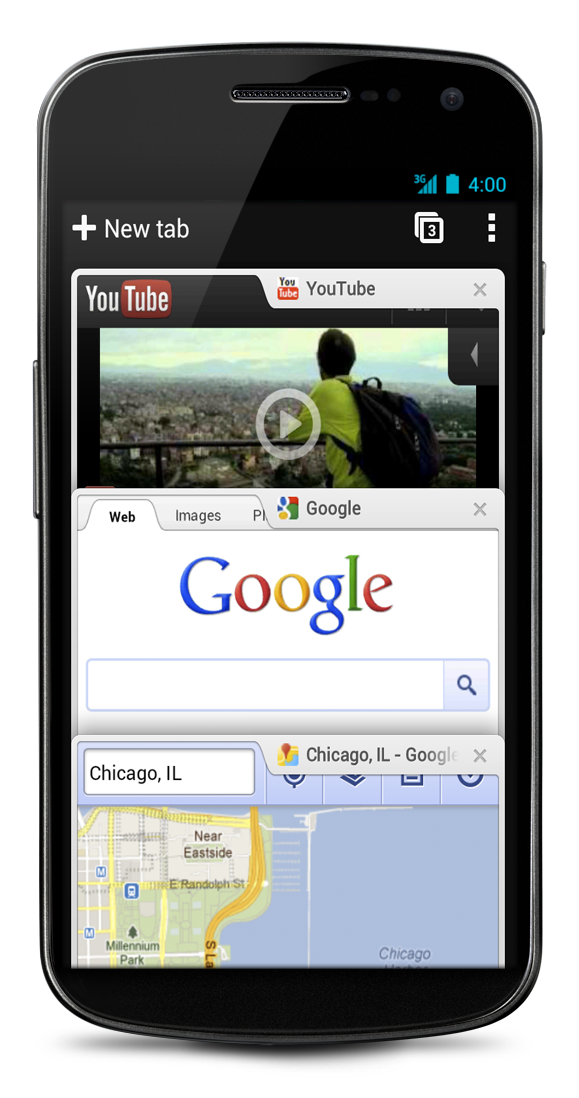
SimplicityChrome for Android is designed from the ground up for mobile devices. We reimagined tabs so they fit just as naturally on a small-screen phone as they do on a larger screen tablet. You can flip or swipe between an unlimited number of tabs using intuitive gestures, as if you’re holding a deck of cards in the palm of your hands, each one a new window to the web.
 One of the biggest pains of mobile browsing is selecting the correct link out of several on a small-screen device. Link Preview does away with hunting and pecking for links on a web page by automatically zooming in on links to make selecting the precise one easier.And as with Chrome on desktop, we built Chrome for Android with privacy in mind from the beginning, including incognito mode for private browsing and fine-grained privacy options (tap menu icon, ‘Settings,’ and then ‘Privacy’).
Sign inYou can now bring your personalized Chrome experience with you to your Android phone or tablet. If you sign in to Chrome on your Android device, you can:
- View open tabs: Access the tabs you left open on your computer (also signed into Chrome)—picking up exactly where you left off.
- Get smarter suggestions: If you visit a site often on your computer, you'll also get an autocomplete suggestion for it on your mobile device, so you can spend less time typing.
- Sync bookmarks: Conveniently access your favorite sites no matter where you are or which device you’re using.
 Chrome is now available in Beta from Android Market, in select countries and languages for phones and tablets with Android 4.0, Ice Cream Sandwich. We’re eager to hear your feedback. Finally, we look forward to working closely with the developer community to create a better web on a platform that defines mobile.
Posted by Sundar Pichai, SVP, Chrome and Apps
(Cross-posted from the Chrome blog and the Official Google blog)
The last year has been a phenomenal one for the Android ecosystem. Device activations grew 250% year-on-year, and the total number of app downloads from Android Market topped 11 billion. As the platform continues to grow, we’re focused on bringing you the best new features and innovations - including in security.
Adding a new layer to Android security
Today we’re revealing a service we’ve developed, codenamed Bouncer, which provides automated scanning of Android Market for potentially malicious software without disrupting the user experience of Android Market or requiring developers to go through an application approval process.
The service performs a set of analyses on new applications, applications already in Android Market, and developer accounts. Here’s how it works: once an application is uploaded, the service immediately starts analyzing it for known malware, spyware and trojans. It also looks for behaviors that indicate an application might be misbehaving, and compares it against previously analyzed apps to detect possible red flags. We actually run every application on Google’s cloud infrastructure and simulate how it will run on an Android device to look for hidden, malicious behavior. We also analyze new developer accounts to help prevent malicious and repeat-offending developers from coming back.
Android malware downloads are decreasing
The service has been looking for malicious apps in Market for a while now, and between the first and second halves of 2011, we saw a 40% decrease in the number of potentially-malicious downloads from Android Market. This drop occurred at the same time that companies who market and sell anti-malware and security software have been reporting that malicious applications are on the rise. While it’s not possible to prevent bad people from building malware, the most important measurement is whether those bad applications are being installed from Android Market - and we know the rate is declining significantly.
Android makes malware less potent
In addition to using new services to help prevent malware, we designed Android from the beginning to make mobile malware less disruptive. In the PC model, malware has more potential to misuse your information. We learned from this approach, designing Android for Internet-connected devices. Some of Android’s core security features are:
- Sandboxing: The Android platform uses a technique called “sandboxing” to put virtual walls between applications and other software on the device. So, if you download a malicious application, it can't access data on other parts of your phone and its potential harm is drastically limited.
- Permissions: Android provides a permission system to help you understand the capabilities of the apps you install, and manage your own preferences. That way, if you see a game unnecessarily requests permission to send SMS, for example, you don’t need to install it.
- Malware removal: Android is designed to prevent malware from modifying the platform or hiding from you, so it can be easily removed if your device is affected. Android Market also has the capability of remotely removing malware from your phone or tablet, if required.
CircusExtreme_TurboCamels(240x320).jad
CircusExtreme_TurboCamels(240x320).jar ( 160 KB )


CircusExtreme_TurboCamels(240x320).jad
CircusExtreme_TurboCamels(240x320).jar ( 160 KB )
Even better, Google Docs automatically updates your offline files when you’re on Wi-Fi. You can also manually update files anytime you have a data connection by opening the file or tapping ‘Update’ from the Offline section of the app.
 |  |
| Make file available offline | Update online file |
 |
| Make file available offline |
 |
| Update offline file |
For those of you with Android tablets, we’ve also improved the Google Docs reading experience. Now, when you open a Google document on your tablet while online, you’ll get a high-resolution version of the document. Swipe left and right to flip between pages, or use the slider at the bottom to page ahead quickly.
 |
| New reading layout on Android tablet |
You can learn more about offline capabilities and the new reading layout in our Help Center.
Whether you’re offline or online, these improvements will make it easier to be productive from anywhere.
Posted by: Freeman Liu, Software Engineer